


mouzekitAfter Effects
Ring Layers round a centre: radius, arc, face out
Rated 5 stars by a 10,000+ editor production teamTrusted by 10,000+ users
Shortcuts, wheels and gestures for every app on your computer. Built first for video editors.


 Premiere Pro, After Effects, CapCut, Resolve
Everything included · pick how to pay
Premiere ProAfter EffectsCapCutDaVinci Resolve Photoshopand every other app, each with its own profile
One take, six steps, all inside Premiere Pro with mouzeclick Studio and the Tool wheel. Pick a chapter to jump in.
Done. Hidden guides are not exported, each cut kept a copy of the sequence, and Undo mouzeclick edit takes back the last Unnest, Spread or Close synced.
Works with the mouse you already have: any mouse your computer sees, wired, wireless or Bluetooth. No driver, no new hardware. Windows 10 and 11 or macOS 12+, was $40, now $25 a month with everything included.
Office mouse · Wireless · 5 buttons
Around it: the Options wheel of favourites, on F8 or a button you pick.
Calibrate once: it shows only the buttons your mouse really has.
| Works with | Any mouse your computer sees |
|---|---|
| Your mouse | Keep it, no driver |
| Per-app buttons | Yes |
| Wheel of favourites | Yes |
| App & window switcher | Yes |
| Premiere Pro captions & silence remover | Yes |
| After Effects rigs | Yes |
| DPI, sensor, battery, lighting | Not in mouzeclick; they stay with the mouse |
mouzeclick changes what your buttons do. It never touches your mouse’s settings or firmware. Up to five standard buttons, scroll and tilt, on Windows 10 and 11 or macOS 12 and later.
Keep your mouse. was $40, now $25 a month, everything included.
A panel in After Effects and one in Premiere Pro with your tools, presets, rigs and libraries in one place. mouzeclick installs them for you: open either from Window › Extensions › mouzeclick workspace.
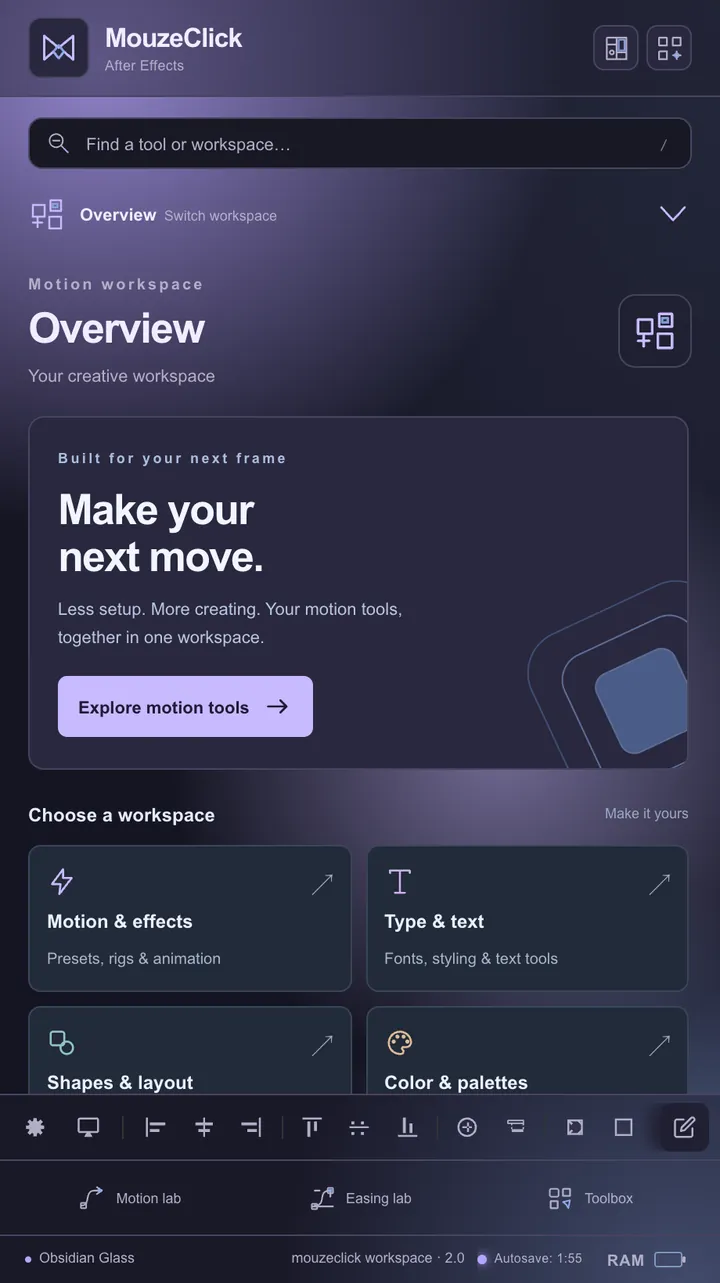
Real panels, as they look on Windows. Each app remembers its own theme.
Everything runs from one small app in the tray or menu bar. No driver, no vendor software.
Your installed effects, all sixteen label colours, eight marker colours, position, zoom and timeline tools, one flick each. 114 tools for After Effects.
See every toolSilences, captions, retakes and timeline tools in a panel inside Premiere. It listens on your computer.
Open the StudioThree rings, 48 favourites per app, on any key or mouse button.
Try the ringsUp to 12 open apps on a wheel. Rest on one for its windows or a browser's tabs.
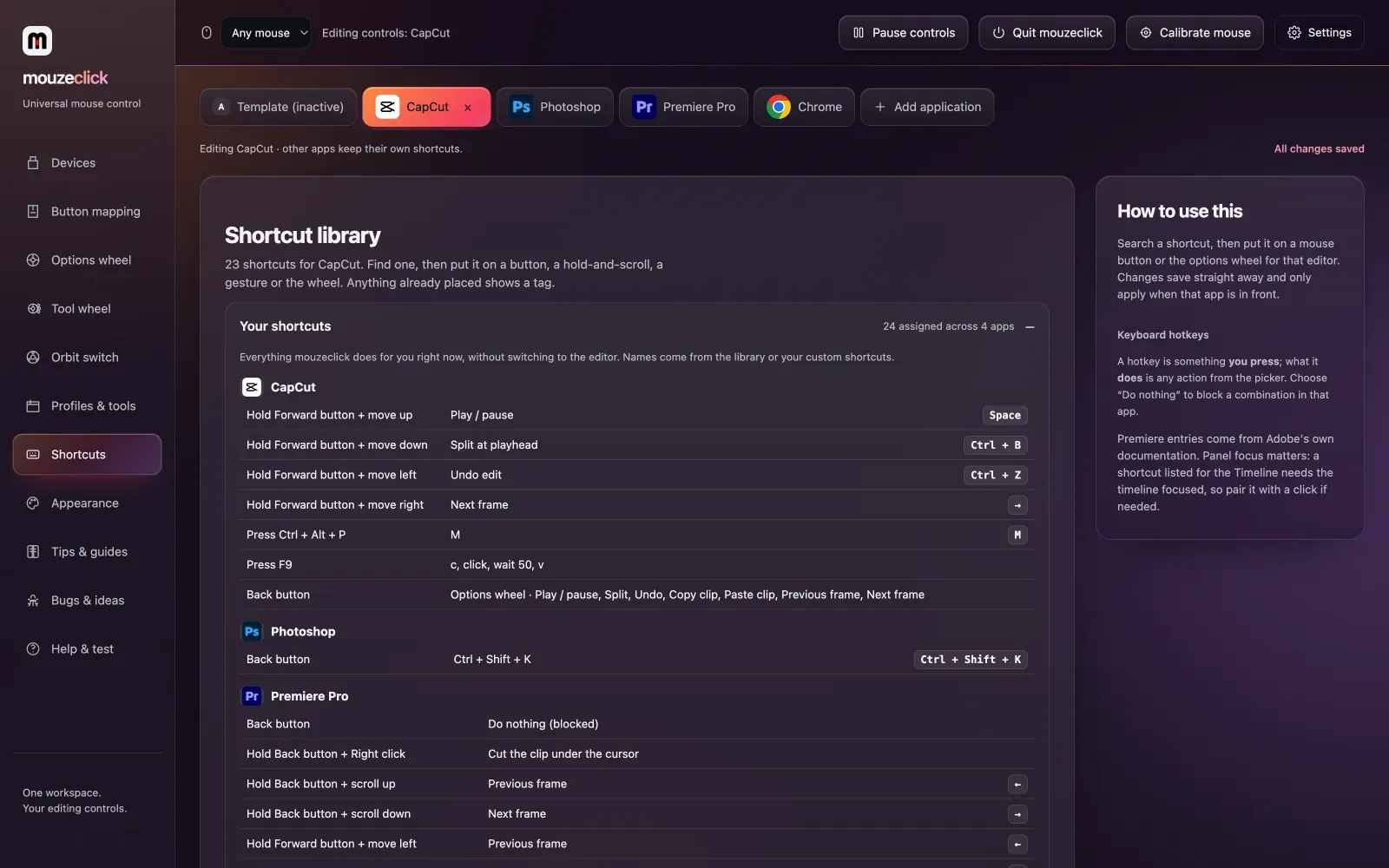
See itPer-app buttons, chords, gestures and hotkeys, on any mouse you own.
Everything elseNine colour sets, five backgrounds, one look across the app, the Studio, the Toolbar and the wheel. Try it on this page.
Change the coloursNew in mouzeclick Studio: it draws your captions itself, in any font and look, timed to every word. English, Hinglish, or Hindi in Devanagari.
In Studio › Captions › Look, choose Styled on the video. mouzeclick draws your captions in the font and look you pick, then lays them on a video track above everything, timed to the words.
Studio › Captions › Language › Hinglish (Roman letters): Hindi and English mixed, written the way people type it, with one spelling per word. English words are never changed.
main aaj bahut khush hoon
maine pehle ye clip select kiya
accha, thoda zoom karte hain
awaaz acchi hai, music nahi chal raha hai
ab ye cut karna padega
Still there as its own choice, next to Hinglish in Roman letters.
Tick it next to Replace all and every new transcript gets it by itself: your name, your brand, or the spelling you prefer.
Whisper, the open speech model, writes the captions on your computer. Hinglish uses the Accurate model, downloaded once.
Studio › Guides draws each platform’s interface over your video, the way the app lays it out: side buttons, username, caption. Then its safe zone, centre lines and thirds, so you can keep your words out from under a heart.
Read this before you scroll
The platform’s own numbers. TikTok: 130 px top, 484 px bottom, 140 px right, 44 px left.
65 presets
TikTok, Instagram Reels and Stories, YouTube Shorts, Facebook Reels and Stories, Snapchat, Pinterest, LinkedIn, X, Threads, WhatsApp Status, Telegram, Moj, Josh, Chingari, Roposo, ShareChat, Douyin, Kuaishou, WeChat Channels, Bilibili, RED, LINE VOOM, Kakao, feed formats, YouTube, Twitch, Vimeo and more, plus TV title and action safe and cinema frames. Search the picker (reels, 4:5, india, ig, yt…) or open a kind like India · Asia · more.
Guides showing: hide or remove them before you export.
The guides are one clip, “⚠︎ GUIDES (mouzeclick)”, with a Magenta label on a track of their own: your footage is never moved or changed. Premiere has no layer that shows but does not export, so the tab warns you while they show.
Add your own grid (rows, columns, margins, gutters), save setups as presets, export and import them. Show / Hide is also a mouse button or wheel action, and a Toolbar tool.
Favourites on F8, your open apps on F9, your editor's tools on F10. Each on any key or mouse button you like.

Hold the trigger and a ring of favourites opens where you are working. Middle click steps out to the second and third ring. Release on a slice and it runs, exactly where you were pointing.
Move the pointer over the wheel to try the rings.
Hold F9 and every application you have open sits on a wheel as its icon, the one you used last first, with a badge when it has several windows.
Hold F10 in Premiere Pro or After Effects. Segments sit round the ring; move onto one and its tools fan out as discs. Flick to a disc and let go.
A practice wheel on a pretend Premiere timeline. Press and hold anywhere on it, move toward a tool and let go. Let go in the centre to cancel.
Every tool you run lands here. Click a step to go back to it.
In mouzeclick the Tool wheel opens over Premiere Pro on F10, or on a held right button with a delay you set from 80 to 600 ms. Each tool confirms itself with a short note by the pointer.
A panel in Premiere Pro (Window › Extensions › mouzeclick Studio). It listens to your clips on your computer, marks what to cut, and changes nothing until you press the button.
Select clips and press Analyse. mouzeclick reads their sound itself, draws the waveform and marks every pause.
Whisper, the open speech model, runs on your machine and puts the captions on a new caption track in Premiere. Each caption starts when the speaking does.
Retakes reads the transcript and finds every restart. When you start a sentence again, the earlier try is struck through and the last one stays.
One press each, on the Studio, on the Tool wheel's Quick segment and on the docked Toolbar.
The Tool wheel talks to Premiere and After Effects through the mouzeclick panel, which keeps itself up to date. Each tool confirms what it did by the pointer.
Ctrl + Ztakes back Null + Parent in one step
The app, the Studio, the Toolbar, the search window and the options wheel share one look. Pick a set and this page changes with it.
In the app: your own three colours, glow and glass sliders, motion on or off, and nineteen classic themes, seven fonts and four interfaces if you prefer them. The look is kept per computer; your shortcuts are not touched.
The mouse part is still the heart of it: every button does the right thing for the app in front.
Mouse 4 cuts a clip in Premiere, switches tabs in Chrome, pastes everywhere else. It changes the moment you switch windows.
Hold one button and press another, move up, down, left or right, or scroll. Eleven slots per button.
Any action on any key combination, per app. A hotkey can also block a combination an app keeps stealing.
Record a shortcut, or chain keys, clicks, waits, typed text and launches. They sit in the picker next to the built-in ones.
Profiles, gestures, hotkeys and every wheel follow you to any Windows computer you sign in on. Share a setup as a link.
First run asks you to press each button once and builds the settings page around the buttons you actually have.
0.51 to 0.58.40, from the release notes. The timeline below runs newest first.
Latest: 0.58.40, stable, 25 Oct 2026. The mouzeclick workspaces for After Effects and Premiere Pro now come to everyone with a mouzeclick licence on Windows. See the workspaces · Read every release note
Ring Layers round a centre: radius, arc, face out
Real screenshots of the app, in the colours you picked.
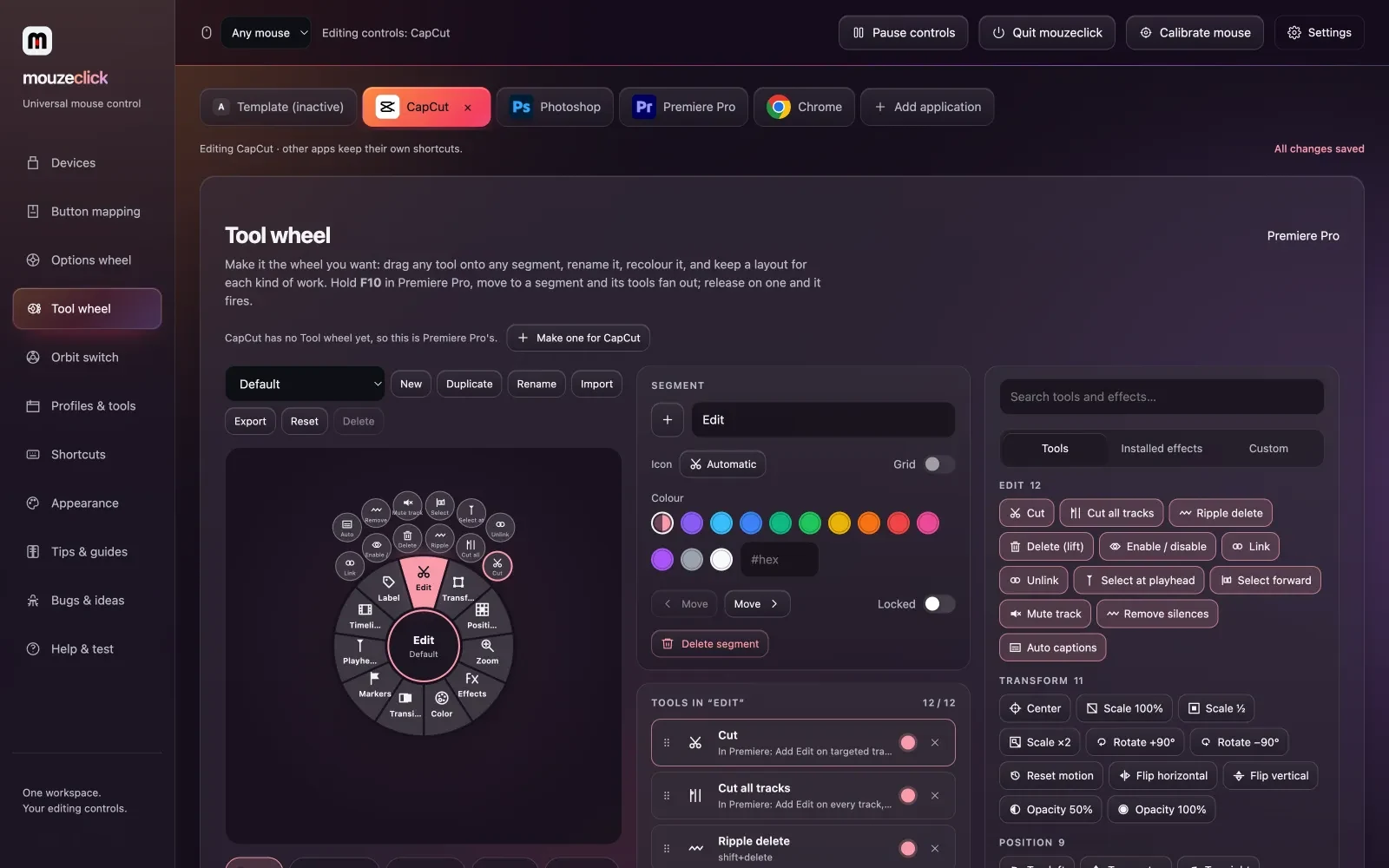
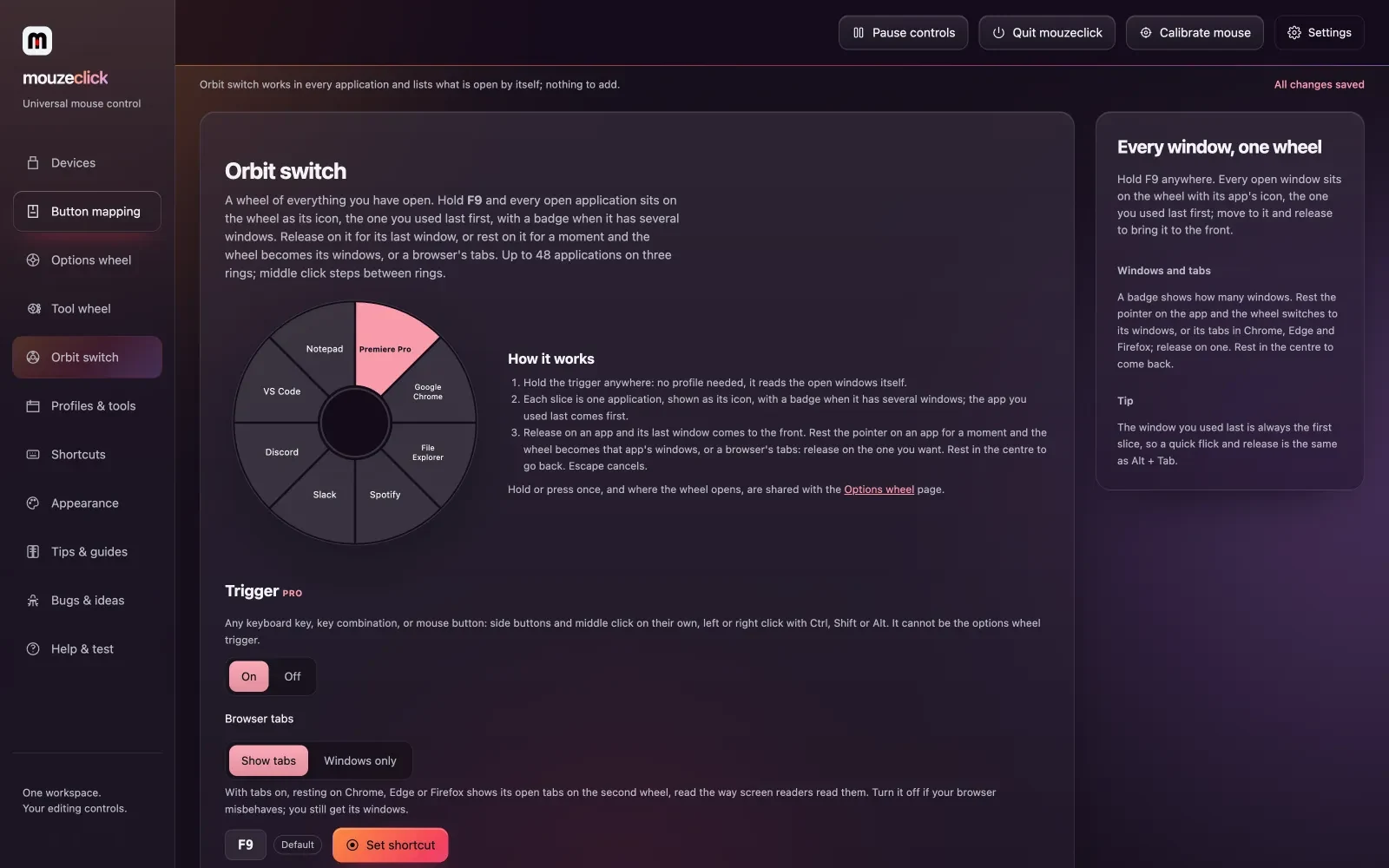
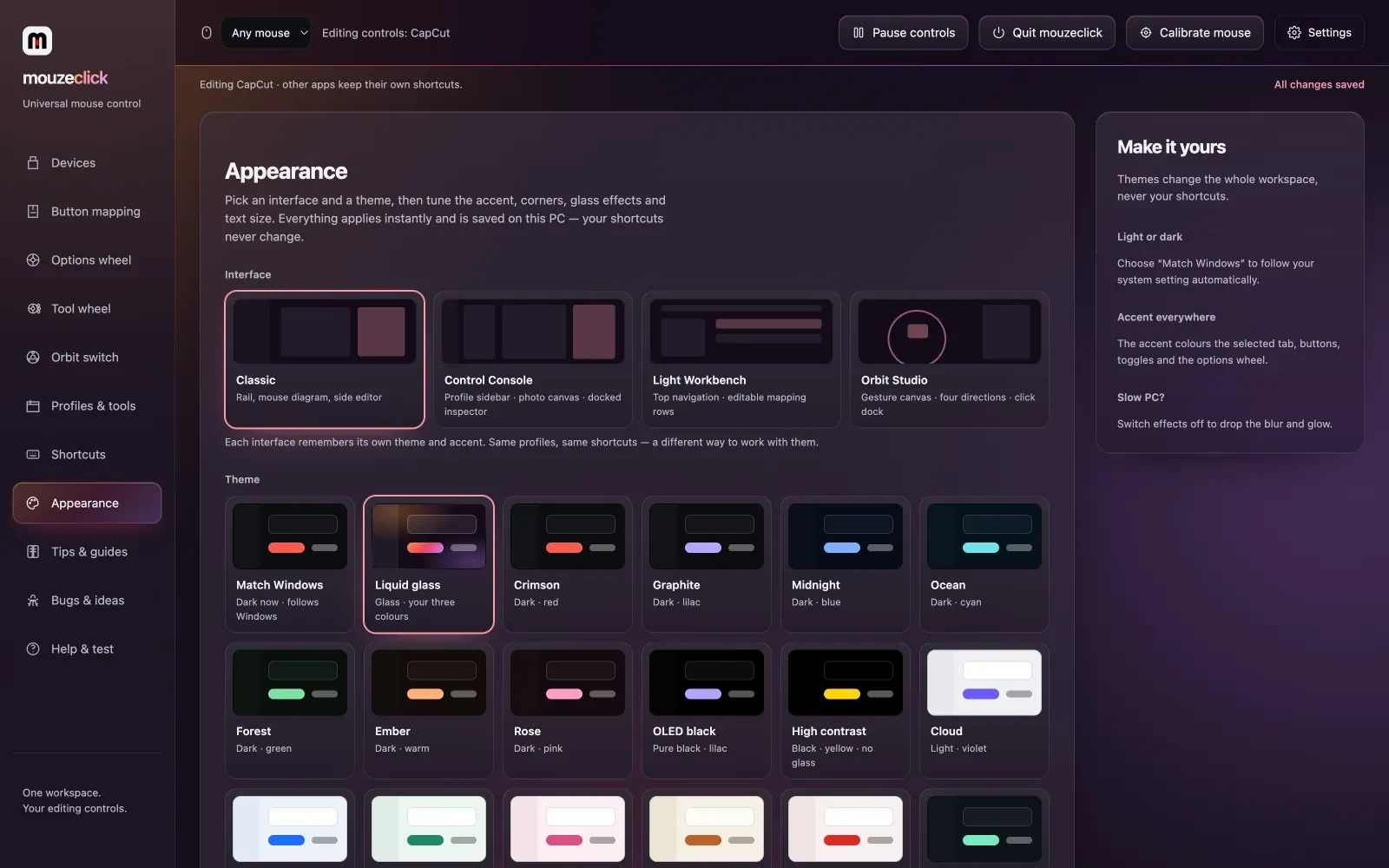
Every tool on the wheel is one click away. Put in your own week and see what the trips to menus and the keyboard add up to.
Drag a slider, or use the arrow keys.
That is more than 8 hours a day. Check your numbers.
About 4.4 hours a month and about 52.8 hours a year: about 6.6 working days.
Worked out only from your four numbers. A year is 12 of those months; a working day is 8 hours.
Try it free for 3 days first, no card. Then one price gets you the app, every Premiere Pro tool and every After Effects extension. Each key is for one person on one computer.
Everything included
Total $25 a month10% off every key
Or pay once for longer
The app
Premiere Pro
After Effects
Priority support by email, for everyone: [email protected]
“Five stars from our whole editing team. One editor asked if they could give 100.”
Not sure yet? Try it free for 3 days, no card.
Billed in US dollars. To cancel a monthly subscription, email [email protected].
One key, one computer.Each key is for one person on one computer at a time. New computer? Release the old one from your account page and enter the key on the new one. A 30-day pass, yearly key or lifetime key is one key; need several? Choose Monthly and how many keys at checkout: 6 or more and every key is 10% off. Agency? Message us on WhatsApp
Your accountThe app walks you through these on first run, with a tour you can replay from Tips and guides.
Enter the key from your email. No driver. Everything runs from one small app in the tray or menu bar.
The setup page learns which buttons your mouse actually has and builds the settings page around them.
Install it once from the Tool wheel page and restart Premiere. After Effects too: restart it once, then Window › Extensions › mouzeclick.
Window › Extensions › mouzeclick Studio or mouzeclick Toolbar. Then hold F8, F9 or F10 in your editor, move, release.
Three ways a monthly, 30-day or yearly key gets longer without paying more.
Report from inside the app, diagnostics attached with one tick. A confirmed bug adds 3 days to your plan, a crash or lost settings adds 7, up to 30 days a quarter. Every verdict comes back by email and the fix shows in Update history.
Your code and link are on the account page. Every account has its own code and link: a friend who hasn't paid for mouzeclick before and uses either gets 10% off their first 30 days or first year (not lifetime, and not a monthly subscription that renews by itself). When that friend's first payment goes through (a 30-day pass, a yearly key or a monthly subscription; a lifetime key doesn't count), you earn 10 days, once per friend. If that payment is refunded, the days are taken back. With a monthly subscription the days are banked: when it ends or a payment fails, the app keeps running for those days. With a 30-day pass or yearly key (and no subscription), the days are added to its end date; if you have both, the subscription gets them. With no key yet, or only a lifetime key, the days wait for your next 30-day, yearly or monthly key. Milestones: 3 paying friends add 30 days, and 10 add a year. A friend counts 30 days after paying, if that payment was not refunded.
Send it from the Bugs & ideas page inside the app. An idea we put on the roadmap adds 2 extra days to your plan (5 in total once it ships), within the same 30 days a quarter as bug rewards.
Price, extensions, captions, the wheels and your audio. Search, or pick a topic.
25 questions
Ask us by email. Priority support by email, for everyone.
[email protected]One plan with everything included: ₹499 a month in India, billed in rupees, and US$25 a month everywhere else, billed in US dollars.Everything was $40 a month. Now $25. Or pay once for longer: ₹4,999 or US$249 for a year (2 months free), or ₹9,999 or US$499 for a lifetime key (the first 100 only).The app. Buttons, chords, gestures, macros with a recorder, per‑app profiles, the three wheels (Options wheel, Orbit switch, Tool wheel) and cloud sync of your settings.Premiere Pro. Studio (silences, captions with styled looks and Hinglish, retakes, timeline tools), safe frame & guides, the Toolbar, effect search and every Premiere panel: mouzestate, mouzsplit, mouzegrade, mouzezoom, mouzetrans, mouzebeat, mouzebin and mouzemark.After Effects. Every extension: mouzekit, mouzerun, mousecut, mouzegrade, mouzmic, mouzelayer, mouzesaas, mouzetype, mouzecam, mouzeicons, mouzeaccent, mouzevector, mouzeresize, mouzeflow, mouzeexpr and the After Effects Tool wheel.Also. mouzetime, and priority support by email, for everyone.
Two ways, same price. 30 days, pay once: one payment (UPI, card or net banking in India; card elsewhere), no auto-debit and nothing to cancel. 3 days before the end we email you a link to pay for another 30 days, added to the same key. A 30-day payment is for one key. Monthly, renews by itself: a subscription you can cancel any time by emailing [email protected]. Or pay once for longer: 1 year or lifetime, one key each, no auto-debit (see below). A code takes 10% off the first 30-day or 1-year payment.
Yes, both paid once, with no auto-debit and nothing to cancel. 1 year: ₹4,999 in India or US$249 elsewhere, for 365 days: 2 months free next to paying monthly. 7 days before the end we email you a link to pay for another year, added to the same key. Lifetime: ₹9,999 in India or US$499 elsewhere, about the price of 2 years of Yearly. The key never expires and gets every update for as long as mouzeclick is made. Only the first 100 lifetime keys are sold. Each is one key, for one computer at a time (move it with Release, as usual); for several keys, choose Monthly.
Yes. A code from a friend, or from a creator we work with, takes 10% off your first payment for a 30-day pass or a 1-year key. Codes are for new customers. They don’t apply to lifetime keys or to a monthly subscription that renews by itself, and renewals are at the full price. At checkout, choose Have a code? and type it; if you opened a link with a code, it is filled in for you. Every account has its own code on the account page: when a new customer pays with it for anything but a lifetime key, you get 10 extra days.
A 30-day, yearly or lifetime payment has nothing to cancel: a pass or yearly key simply ends unless you pay again, and a lifetime key does not end. To stop a monthly subscription, email [email protected]. When your time ends, the app pauses and your mouse keeps working as a normal mouse.
Yes: 3 days free, no card. We email your key and the download links, and the 3 days start the first time you open the app with it. The Studio, the Tool wheel and every Premiere Pro and After Effects tool work fully; the Options and Orbit wheels hold 3 favourites until you pay. One free trial per person and per computer. After that, pay for 30 days, monthly, a year or lifetime to keep going; your setup is saved to your account (on Windows).
No refunds after payment: try it free for 3 days first. If mouzeclick doesn’t work on your computer and we can’t fix it within 7 days of your payment, we refund you in full. Email [email protected] within 7 days of the payment and tell us what happens; we try to fix it first. A monthly subscription can be cancelled any time by email and stops at the end of the paid month. Paid before 25 October 2026? Your 7-day refund still stands. Refunds and cancellation.
No. One key is for one computer at a time. Getting a new computer? Release the old one from your account page or inside the app, then enter the key on the new one. A 30-day pass, yearly or lifetime key is one key. Need more computers, or keys for your team? Choose Monthly when you pay and pick how many keys, one per computer. With 6 or more, every key is 10% off: ₹449 in India or US$22.50 elsewhere, a month each.
Under Window › Extensions in Premiere Pro or After Effects. Install them once from the app’s Tool wheel page (Install Premiere bridge, or the After Effects one), then restart the editor. Search effects opens from the Tool wheel. Keep mouzeclick running while you work.
Yes. mouzeclick includes all 15 After Effects extensions, among them mouzekit (28 tools, one undo step each), mouzerun (your own buttons), mousecut (an editor’s timeline), mouzmic (gradients on text and shapes), mouzegrade and mouzelayer (a 3D globe with planes and ships on your routes), plus the After Effects Tool wheel (114 tools in 13 groups). See all 15. The Premiere Pro side is included too: mouzestate, mouzsplit, mouzegrade, mouzezoom, mouzetrans, mouzebeat, mouzebin and mouzemark.
The app runs on Windows 10 and 11, and on macOS 12 or newer (Apple Silicon and Intel) with the same licence key. Its buttons, gestures and macros work in any app, with shortcut libraries for Premiere, CapCut, Resolve, After Effects and Photoshop. The extensions run inside Premiere Pro and After Effects on the same computer. Auto-captions, cloud sync and in-app updates are Windows only for now. Installing on a Mac.
No. mouzeclick draws styled captions into pictures, in any font on your computer or one of its own, and lays them on a video track above everything, timed to the words. They go into their own bin, and one button takes the last set off the timeline.
289 looks in 27 families, such as Bold & kinetic, Neon & glow, Karaoke and Indian & multilingual, that differ in how they are built, not just in colour. Words can Pop, Drop in, Zoom in or Shake, on word boxes, a speech bubble or a lower third, with effects like neon tube, wave and focus.
Yes. Hinglish comes out in Roman letters, the way people type it, with one spelling per word. Hindi in Devanagari is its own choice, with Hindi fonts like Hind, Mukta and Noto Sans Devanagari.
Yes. Click a caption to jump to it, double-click to correct it; words Whisper was unsure of are marked. Find and replace fixes a name everywhere at once.
Only if you leave them showing. The guides are one clip with a Magenta label on a track of their own, and your footage is never changed. Hide or remove them before you export; the Guides tab warns you while they show.
65 presets that show the app’s interface and safe zone over your video: TikTok, Instagram Reels and Stories, YouTube Shorts, Snapchat, Pinterest, LinkedIn, X, WhatsApp Status, Moj, Josh, ShareChat and more, plus TV and cinema frames. Save your own as presets.
It docks in Premiere (Window › Extensions › mouzeclick Toolbar) with 14 tools named, in groups. Find one with / and Enter, pin tools and run them with keys 1–9. It fits any dock: a list, cards, icons or one row.
The Options wheel on F8 (12 + 16 + 20 favourites on three rings, per app), the Orbit switch on F9 (up to 12 open apps, then their windows or browser tabs) and the Tool wheel on F10. Each goes on any key or mouse button. The After Effects Tool wheel is included too.
Yes: any mouse your computer sees, wired, wireless or Bluetooth, on Windows 10 and 11 or macOS 12 and later. It uses up to five standard buttons plus scroll and tilt; first run asks you to press each one.
No driver: install it and paste the key from your purchase email. On Windows, shortcuts don’t reach games or apps running as administrator; for those, pick Restart as administrator in the tray menu.
On Windows, a new version opens its own screen: what is new, then one press to install. It counts down before restarting (Not now stops it). mouzeclick keeps its Premiere and After Effects extension files up to date itself.
No. Silence detection and captions (Whisper) run on your computer. The speech model downloads once (Fast 60 MB, Accurate 190 MB or Best 574 MB); after that your audio never leaves the machine.
No. mouzeclick needs an internet connection while it runs, because your licence and profiles live in your account. If it drops, the shortcuts pause and your mouse behaves normally until it is back.
Profiles, gestures, hotkeys and every wheel follow you to any Windows computer you sign in on, and a setup can be shared as a link. Your look (colours, themes and fonts) stays on each computer.
No match. Email [email protected]
Everything included, was $40, now $25 a month. Pay once for 30 days, or monthly. Or pay once for 1 year or lifetime. Billed in US dollars.
Windows 10 / 11 · macOS 12+Any mouse your computer seesEverything included