Home / Extensions

Rated 5 stars by a 10,000+ editor production teamTrusted by 10,000+ users

Premiere Pro · After Effects

Every extension, mapped out.

22 extensions and four core panels, placed by the app they run in, and every one is included in mouzeclick. The map shows the first eight; every extension has a card below.

22 extensions · 4 core panels

Every extension and core panel is included in mouzeclick, was $40, now $25 a month. See the price

mouzekit panelNew in 0.54

mouzekit

After Effects

28 After Effects tools in one searchable panel

Seven groups: Rigs, Properties, Layers and time, Looks, Text, Tidy and Make. Each tool is one undo step, rolled back if it fails part way; rigs keep their settings in Effect Controls, ready to keyframe.

  • Rigs: Wiggle, Trail, Ring, Layout, Chain, Radial and Squash; Alt-click takes a rig off
  • Looks: Shadows from a light you move, Trails, Boil, Round corners, Grain, Noise roll
  • Text in: eight looks, by character, word or line, with a live preview
More
  • Properties: Lock, Split axes, Controls, and Select same property on every layer
  • Layers and time: Rename with numbering, Stagger, Reverse order, Extend start, Time remap
  • Tidy: shy and lock layers, merge duplicate solids, merge matching shape groups
  • Make: a 3D backdrop with a curved floor, and a line with a length control
  • Search finds a tool; clicking a dimmed tile says what to select first
  • Its expressions work in any language of After Effects

It needs Installed from the mouzeclick app, which also sends the panel its latest script while it runs. Most tools need an open composition and a selection; Merge solids works on the whole project.

Window › Extensions › mouzekitSee it move
mouzestate panelNew in 0.54

mouzestate

Premiere Pro

Animate clips between a start look and an end look

Set a clip’s start and end look: position, scale, rotation, opacity and crop. It is keyed with the ease, spring or bounce you pick, as Premiere’s own keyframes, so the clips play without any plugin.

  • 15 ready looks, such as Rise in, Pop, Wipe open, Letterbox and Picture in picture
  • Easing curves, your own curve with drag handles, a spring or a bounce
  • Move start to end, end to start, there and back, or hold either look
More
  • Drag the clip in the preview to place the look you are editing
  • Time it at the clip’s start, at its end or across the whole clip
  • Apply to up to 40 selected clips at once; each is timed to its own length
  • Match a neighbouring clip’s mouzestate move, and bake again after a trim
  • Remove puts the selected clips back to how they looked before
  • Space plays the preview; Enter applies

It needs The mouzeclick extensions installed from the mouzeclick app, a sequence open in Premiere Pro, and video clips selected on the timeline.

Window › Extensions › mouzestateSee it move

mouzerun panelNew in 0.54

mouzerun

After Effects

Make your own one-click buttons for After Effects

Five kinds of button: one runs a script, puts an expression on selected properties, applies an animation preset, runs a menu command or sets an ease on selected keyframes.

  • Scripts: typed code or a .jsx file; they get a value and Alt, Shift, Ctrl
  • Each run is one undo step, except menu commands; scripts can opt out
  • Alt-click runs another button, or the same script with Alt set
More
  • Groups, colours, icons and search; right-click to change, duplicate, move or delete
  • Export and import your buttons as a file to share or back up
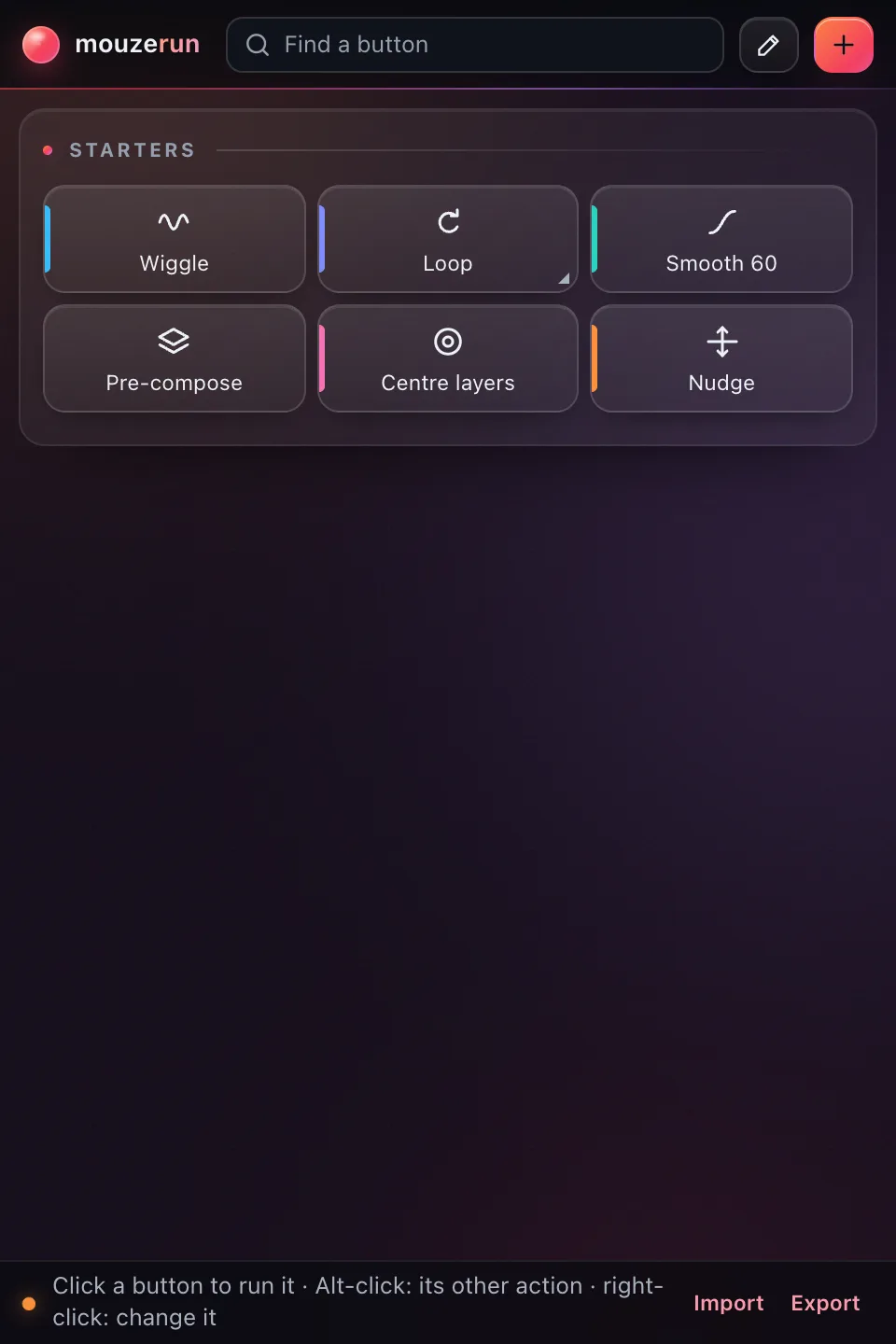
  • Starts with six example buttons, including Wiggle, Loop, Smooth 60 and Pre-compose
  • Presets can make a solid, shape or text layer when nothing is selected

It needs Installed from the mouzeclick app; your buttons are saved in its folder, so updates keep them. Expression, preset and ease buttons need an open composition with properties, layers or keyframes selected; menu commands use After Effects’ English menu text or the command number.

Window › Extensions › mouzerunSee it move

mousecut panelUpdated in 0.54

mousecut

After Effects

An editor’s timeline for your After Effects compositions

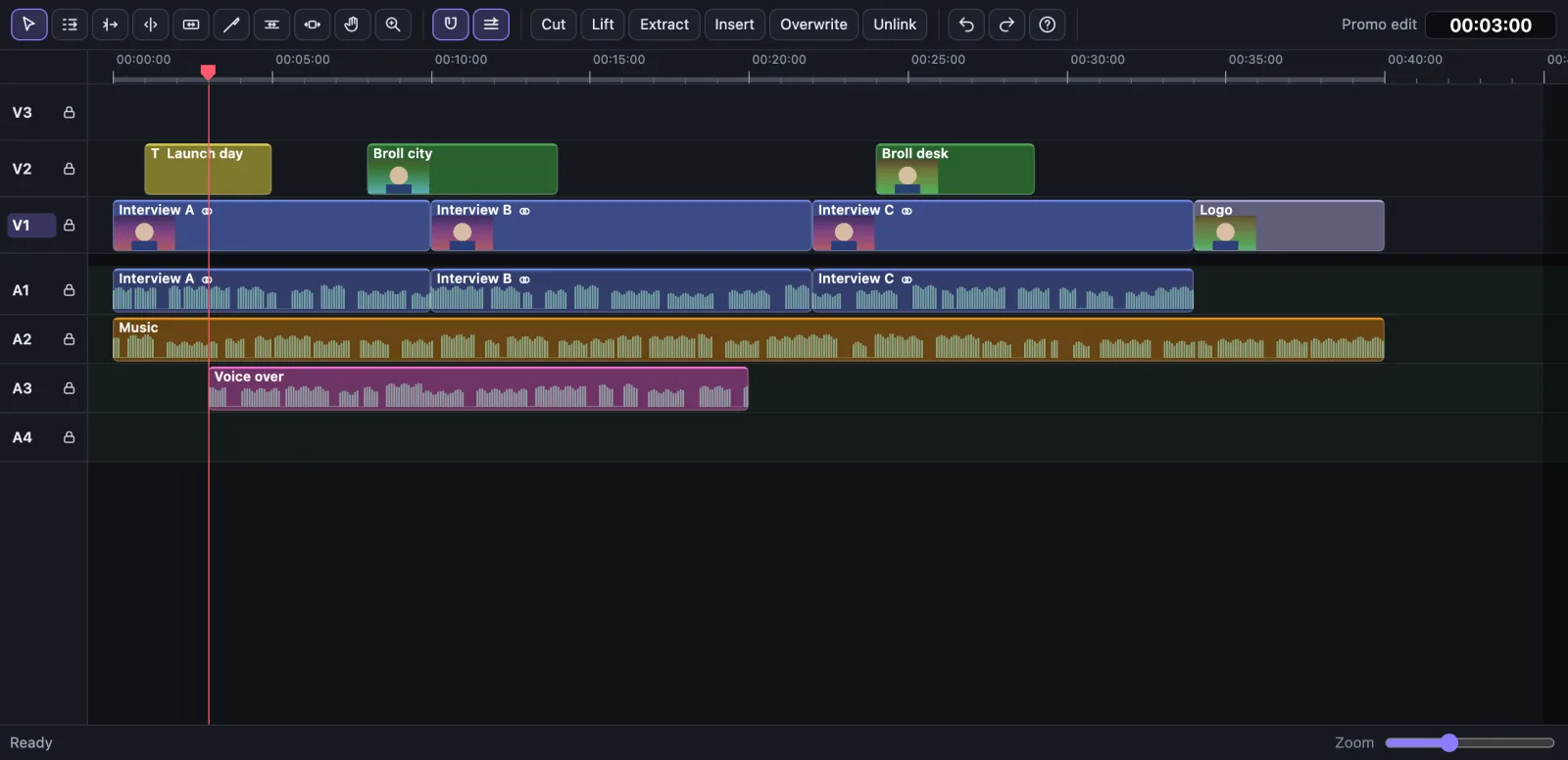
The active composition as an editing timeline: layers become clips on video tracks, sound sits on audio lanes, and you cut, trim, ripple and move them with editing tools and keys.

  • New: G closes the gaps between clips; Alt+←/→ nudges the selected clips a frame (Shift: ten)
  • Ten tools: selection, track select, ripple, roll, rate stretch, razor, slip, slide, hand, zoom
  • Drag clips to move them; Ctrl-drag to insert, Alt-drag to copy
More
  • Each edit is one After Effects undo step; a failed edit leaves the comp unchanged
  • Insert or overwrite Project panel footage at the playhead on the targeted track
  • Lift or extract between In and Out points, and ripple delete
  • Snaps to cuts, the playhead, In and Out points, and markers
  • Unlink picture and sound into two layers; link them again while they line up
  • Waveforms and thumbnails on clips, track locks, clip groups, copy and paste, markers

It needs After Effects with a composition open. mouzeclick running on the same computer to draw clip waveforms and thumbnails. In After Effects before 2023, layers that use track mattes are edited in After Effects’ own timeline.

Window › Extensions › mousecutSee it move

mouzegrade panelUpdated in 0.54

mouzegrade

Premiere ProAfter Effects

Point-and-click colour grading for Premiere Pro and After Effects

It grabs the frame under the playhead so you grade it by clicking and dragging on the picture, with scopes beside it. Apply writes the grade onto the clip as an ordinary colour effect you can open again later.

  • Drag up or down on the picture to brighten or darken that tone range
  • Click to set white balance, the black point, or put skin on the skin line
  • Waveform, RGB parade, vectorscope with a skin line, and histogram
More
  • Sliders for temperature, tint, exposure, contrast, highlights, shadows, whites, blacks and saturation
  • Six built-in looks with a strength slider; save your own looks, copy and paste grades
  • Load a .cube LUT to preview it and mix it into the grade
  • Set a reference shot, then match selected clips to its colour and contrast
  • Before and after split, false colour exposure zones, and a skin guide
  • New in 0.54: Studio’s liquid glass, and it follows Studio’s Look

It needs A sequence open in Premiere Pro, or a composition open in After Effects, with the playhead over a clip. mouzeclick installed on the same computer: grades and saved looks are kept in its folder.

Window › Extensions › mouzegradeSee it move

mouzmic panelUpdated in 0.54

mouzmic

After Effects

Colour gradients and loops on After Effects text and shapes

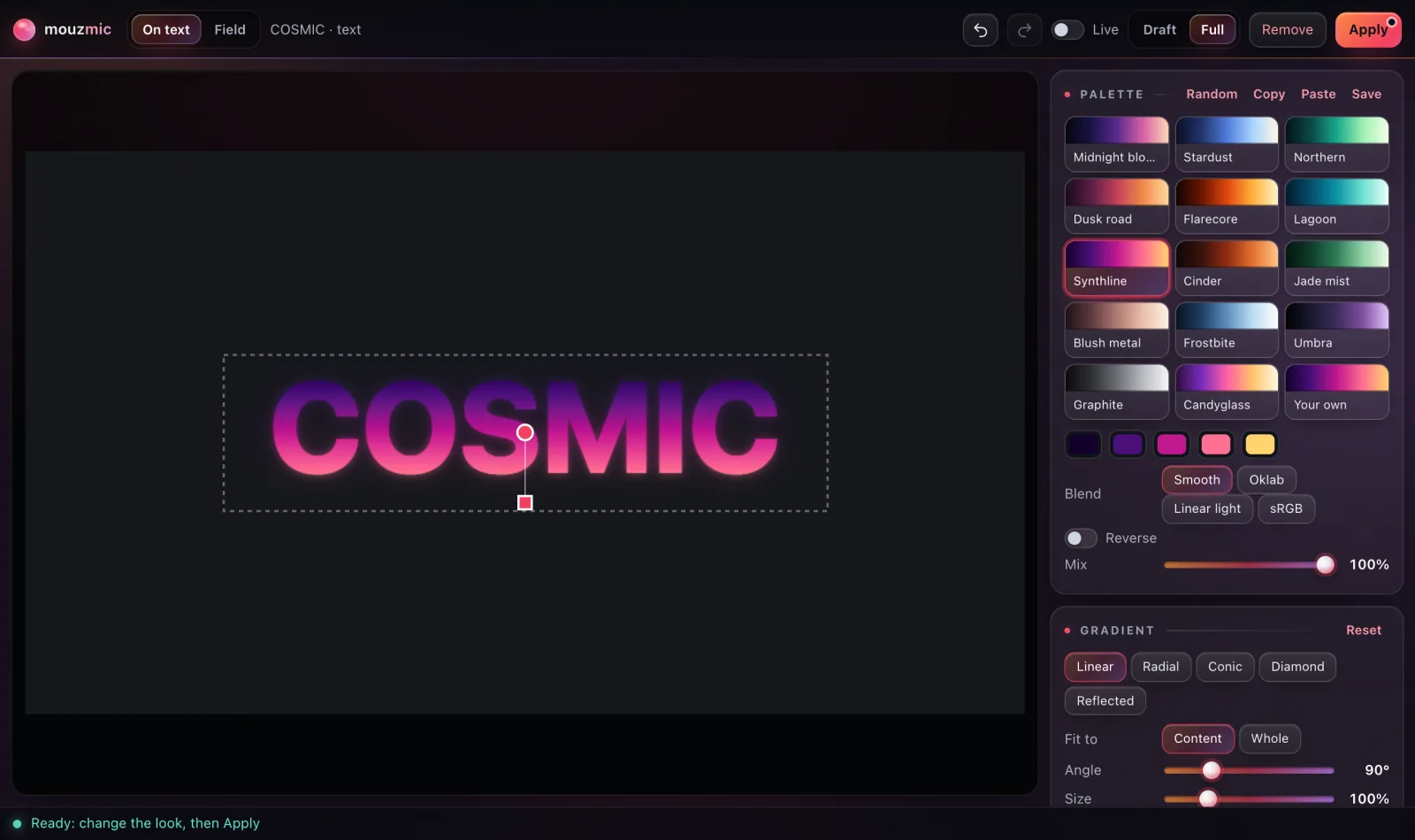
It paints a colour gradient in the panel and puts it on the selected layers with After Effects’ own Calculations, Glow and Noise effects. The text or shape stays live and editable, and a loop setting animates the gradient.

  • 14 built-in palettes, your own five colours, and saved looks
  • Five gradient types: linear, radial, conic, diamond and reflected
  • Loops up to 20 seconds long, at most 900 frames, painted frame by frame
More
  • Depth shapes, turbulence and a focus point shape the colour field
  • Glow, diffusion and grain as After Effects effects you can open and animate
  • Live mode updates After Effects each time you let go of a control
  • Copy, paste and random looks; each apply or removal is one undo step
  • Works on text and shape layers, and on footage, solids and precomps
  • New in 0.54: Studio’s liquid glass, and it follows Studio’s Look

It needs After Effects with a composition open and a text or shape layer selected (footage, solid and precomp layers also work). mouzeclick installed on the same computer. Gradient pictures are saved next to the project once it is saved, otherwise in mouzeclick’s folder.

Window › Extensions › mouzmicSee it move

mouzsplit panelUpdated in 0.54

mouzsplit

Premiere Pro

Split screens and reframes built as a real Premiere sequence

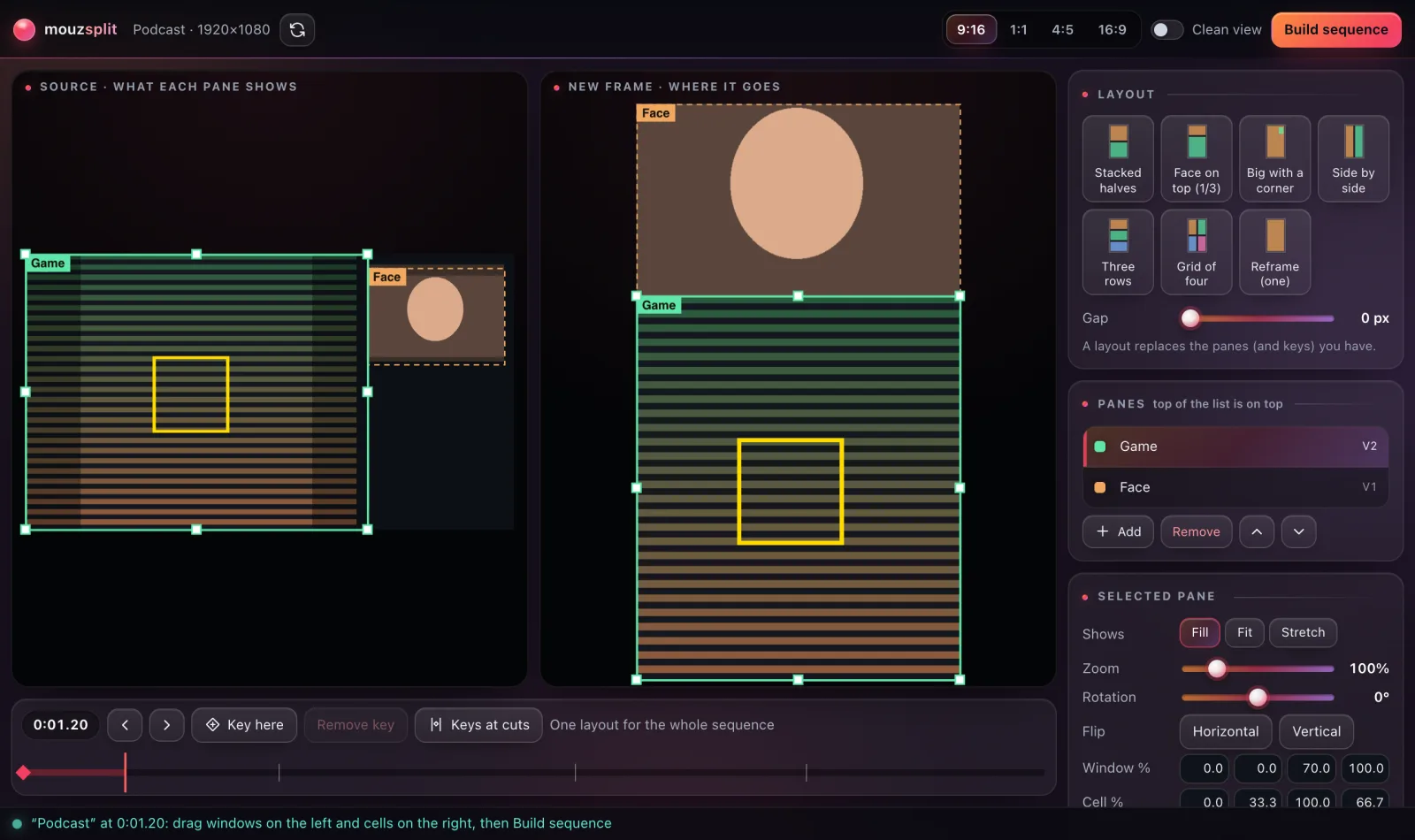
It turns a sequence into a split-screen or reframed one, such as a vertical cut with a face cam on top. Choose what each pane shows and where it sits; Build sequence makes a new sequence and leaves the source untouched.

  • Seven layouts, such as face on top, side by side and grid of four
  • New frame in 9:16, 1:1, 4:5 or 16:9
  • Drag windows on the source and cells on the new frame; edges snap into line
More
  • Per pane: fill, fit or stretch, zoom from 25 to 400 %, rotation and flips
  • Layout keys change the split over time; one click adds a key at every cut
  • Built with Premiere’s own Crop and Motion; only the bottom copy keeps its sound, so the audio is not doubled
  • Add, rename, reorder or remove panes, with an optional 0 to 80 px gap
  • New in 0.54: Studio’s liquid glass, and it follows Studio’s Look

It needs The mouzeclick extensions installed from the mouzeclick app, and the sequence to split open in Premiere Pro.

Window › Extensions › mouzsplitSee it move

mouzelayer panelNew in 0.54

mouzelayer

After Effects

A 3D globe with planes and ships on your routes

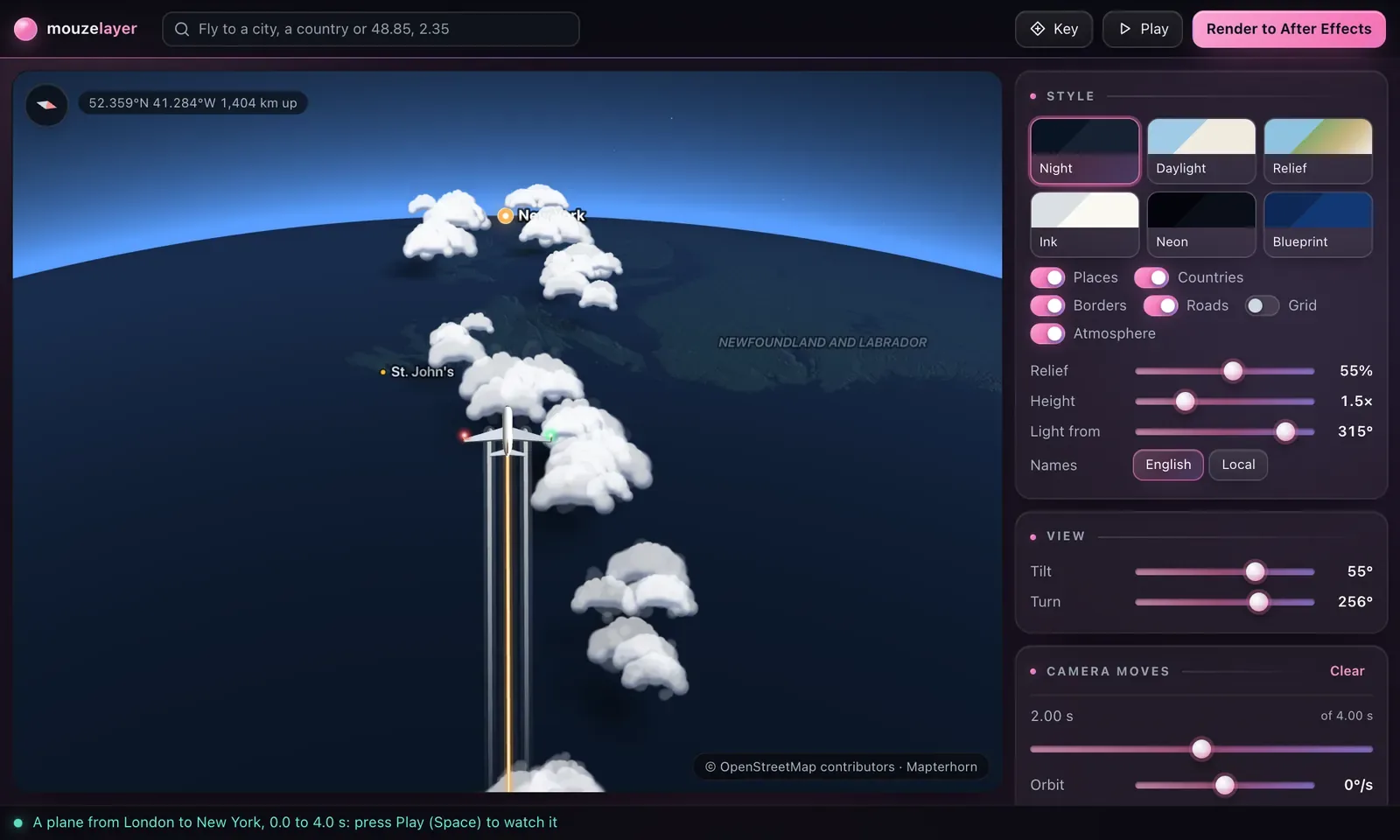
Fly the camera between places, pin them, and send a plane, a jet, a ship or a glowing dot between them. Render it and it becomes a new comp, with the routes on their own layer, a null following each one, and the pins as layers you can restyle.

  • Planes and jets climb up through banks of cloud and come down through them; switch the clouds off per route
  • Ships go by sea, round the land and through canals and straits such as Suez and Panama, with a wake, a bow wave and funnel smoke
  • A Chase camera flies behind it; Follow keeps it in the middle
More
  • Contrails up high, wingtip vortices low down, landing lights, wingtip strobes and a jet’s afterburner
  • Camera moves between places: flight, glide or cut, with easing and a steady orbit
  • Place search: every town of 15,000 people or more, every country, or coordinates
  • Six map styles with terrain: Night, Daylight, Relief, Ink, Neon and Blueprint
  • Per route: when it leaves, how long it takes, pace, arc, size and line; routes chain one after another
  • Output at comp size, 1080p, 4K, vertical or square, over space, clear or a colour, in one undo step

It needs mouzeclick running with an activated licence, and an internet connection for the map data.

Window › Extensions › mouzelayerSee it move

New in 0.56

mouzevector

After Effects

SVG artwork to editable shape layers that draw on

Paste SVG with Ctrl+V, drop an .svg file, or copy a frame from Figma as SVG. Import as shapes turns it into After Effects shape layers you can edit, and Animate in draws them on as they land.

  • Rectangles and ellipses stay live; size it as a share of the comp, or trim to the drawing
  • Animate in: Draw on, Fill after stroke, Pop or Fade up, with order, timing and rise
  • Recolour: read the colours of selected layers and give every fill and stroke a new one
More
  • Split to layers: each part becomes its own layer, where it was, anchored on its own middle
  • A report lists what was converted and what was not
  • Alt-click takes the animation off; retime it later with the controls in Effect Controls
  • Preview it beside the SVG as a browser draws it, on a light or dark background

Window › Extensions › mouzevector

New in 0.56

mouzeresize

After Effects

One comp, every format

Pick sizes and Make sizes builds a copy of the finished comp for each one, with every layer placed by its rule. Change the master later and Update sizes brings the copies up to date.

  • Vertical 9:16, Square 1:1, Portrait 4:5, Classic 4:3, Wide 16:9, Cinema 21:9, or your own width and height
  • Layer rules: Pin, Scale to fit, Cover, Stretch, Keep or Resize inside
  • Safe areas: a 5% margin, title safe 10%, a rough vertical app UI, or your own margins
More
  • Pinned layers stay inside the safe area; add a safe-area guide layer if you want one
  • Keep my changes protects a layer you edited in a size from Update sizes
  • Name comps and files with {comp}, {ratio}, {w} and {h}
  • Add every size to the Render Queue with your render settings and output module

It needs The finished comp open in After Effects.

Window › Extensions › mouzeresize

New in 0.56

mouzeflow

After Effects

15 transitions between layers

Pick a transition, select the layers and press Apply. It goes in at every junction of the selected layers, or at the playhead over everything below.

  • Push, Zoom through, Whip, Spin, Circle reveal, Shape wipe, Split, Blinds and more
  • Duration, ease, direction, angle, strength and colour for each transition
  • Motion blur puts streaks on what moves fast
More
  • All 15: Push, Zoom through, Whip, Spin, Circle reveal, Shape wipe, Split, Blinds, Pixelate, Blur dissolve, Light flash, Glitch, Ink reveal, Iris and Swipe card
  • A preview of the picked transition plays in the panel
  • Arrow keys move between transitions; Enter applies the picked one
  • Remove takes mouzeflow’s transitions off and touches nothing else

Window › Extensions › mouzeflow

New in 0.56

mouzeexpr

After Effects

24 ready-made expressions with settings

Select properties in After Effects, pick an expression, and Apply puts it on every selected property it fits. Update changes it in place, Remove takes it off with its controls, and Bake turns it into keyframes.

  • Motion: Inertial bounce, Elastic, Oscillate, Drift, Squash and stretch, Time spin, Loop
  • Text and numbers: Countdown or clock, Number format, Text from list, Typewriter
  • Links: Delay follow, Stick to, Look at, Path follow, Box to text
More
  • Also Random hold, Value from marker, Blink, Auto-fade, Snap to grid, Clamp, Keep stroke width and Parent-free scale
  • Bake to keyframes over the work area: one key a frame, or Fewer keys within a tolerance
  • Alt-click Apply replaces expressions of your own too
  • Search, and favourites to show only the ones you use

Window › Extensions › mouzeexpr

New in 0.56

mouzebin

Premiere Pro

Tidy a Premiere Pro project’s bins

It reads the project, sorts items into bins by your rules, finds unused, duplicate and offline media, relinks, renames in batch and colours labels by rule. Restore puts back the last change it made.

  • Organise: top to bottom, the first rule that fits says which bin an item goes in
  • Unused: media no sequence uses, or the chosen ones do not; move, label or remove it
  • Remove takes items out of the project only; files on disk are never deleted
More
  • Keep bins as they are with a lock, and nothing moves out of them
  • Duplicates: move copies to a bin, or merge them with Premiere’s own Consolidate Duplicates
  • Offline: relink from a folder, and the folders inside it
  • Rename: find and replace, patterns, prefix, suffix and numbering, with a preview
  • Label rules, and a project report you can copy as text

It needs A project open in Premiere Pro.

Window › Extensions › mouzebin

New in 0.56

mouzemark

Premiere Pro

Markers into chapters, files and cuts

It lists the sequence’s markers with time, name, comments and length, and turns them into YouTube chapters, marker files, edits, sequences or subclips.

  • YouTube chapters from the markers or colours you pick, ready to paste into the description
  • Export CSV, text, SRT, EDL or JSON; import chapters, CSV, timecodes, SRT or EDL
  • Markers into edits on the targeted tracks or on every unlocked track
More
  • Ranges: duration markers, or marker to marker, become a sequence each or one together
  • Subclips from duration markers, in a bin named mouzemark subclips
  • Batch: recolour, rename with numbers, shift, snap to the nearest cut, remove duplicates
  • Copy clip markers to the sequence, and sequence markers to a clip
  • Undo takes back mouzemark’s last change

It needs A sequence open in Premiere Pro.

Window › Extensions › mouzemark

New in 0.55

mouzesaas

After Effects

A SaaS animation kit

App screens that float and tilt with rounded corners and soft shadows; browser, laptop and phone frames; glass cards; animated gradient backdrops.

  • A cursor that clicks with ripples; typing text, word reveals and counters
  • Bar, line and donut charts
  • Pop-ins, notifications, spotlight, zoom to a point and scrolling pages
More
  • Smooth eases (Soft, Glide, Snappy, Build up, Overshoot, Bounce), toggles, buttons, progress bars and loaders
  • Five palettes, Indigo, Ocean, Sunset, Mint and Graphite, or your own colours
  • Search finds a tool; select layers in After Effects, then pick one

Window › Extensions › mouzesaas

New in 0.55

mouzetype

After Effects

17 kinetic type styles you can retime

Select text layers and pick a style. It goes on as real After Effects text animators, so Retime changes the timing later without applying it again.

  • Two groups: In and out, and Accents, loops and exits
  • Styles such as Rise, Scale pop, Blur in, Flip 3D, Typewriter, Wave, Glitch and Highlight bar
  • Retime: Faster or Slower changes every time at once
More
  • Lines to layers: one layer per line, each starting a little later, and every line keeps its timing
  • Remove styles takes off only what mouzetype made

Window › Extensions › mouzetype

New in 0.55

mouzecam

After Effects

A camera rig with ready moves

A camera rig with push, orbit, crane, dolly zoom and whip moves, handheld drift, parallax depth and rack focus.

  • Moves: Push in, Pull out, Orbit, Crane, Truck, Dolly zoom, Whip pan and Settle
  • Ready shots: Hero reveal, Product float, Slow push, Orbit showcase and Top drop
  • Parallax spread and Flatten back keep your keyframe timing and your selection
More
  • Focus on a layer, rack focus, and handheld drift
  • Look at and Frame layer aim the camera at a layer
  • Options hold how long, how far and which lens, for every tool

It needs A composition open in After Effects.

Window › Extensions › mouzecam

New in 0.55

mouzeicons

After Effects

90 UI icons that draw on

90 original UI icons as shape layers. Click one to put it in the comp, Alt-click to swap the selected icon layers to it, or Shift-click to pick several for a grid.

  • Groups: Interface, People and chat, Media, Data, Commerce, Time and more
  • Outline, Filled or Duotone, with size, stroke, tint and a badge
  • Animate in: Draw on, Pop, Fade up, Spin in or Stroke then fill
More
  • Recolour the selected icons, or give each the next palette colour in turn
  • Icon grid: columns, gap, and a stagger when animated
  • Places icons correctly with a camera, light or 3D layer selected
  • Alt-click Animate selected takes the animation off

Window › Extensions › mouzeicons

New in 0.55

mouzeaccent

After Effects

Accents and finishing touches

Pick an accent, select what it is for and press Add. It lands at the playhead and can follow the layer as it moves.

  • Burst, Sparkle, Circle around, Underline, Arrow, Scribble fill, Confetti, Shine sweep and more
  • Size, thickness, how many, speed, length, and a seed for another take
  • Loop keeps it going for as long as the layer lasts
More
  • All 12: also Ripple rings, Pulse dot, Speed lines and Emphasis shake
  • Colour sets such as Sun, Mint, Grape and Ocean, or your own
  • Arrow keys move between accents; Enter adds the picked one
  • Take the shake off keeps the layer’s own expressions

Window › Extensions › mouzeaccent

New in 0.55

mouzezoom

Premiere Pro

Zooms, callouts and blur for screen recordings

Drag a box on a screen recording to zoom smoothly into it, set it on a gradient background with rounded corners, add callouts, blur private details and spotlight a part.

  • Zooms: park the playhead, drag a rectangle, Add zoom; zooms close together pan straight on
  • Background: the recording in a rounded window with a shadow, in your brand colours
  • Callouts: a box, an arrow, a label, a numbered step or an underline
More
  • Blur and redact with a blur, a pixelate or a frosted cover
  • Spotlight with darkness, softness and corners
  • Intro and outro title cards that fade in and out
  • Keys on every frame, so Premiere plays the curve exactly, or four Bezier keys a zoom to change by hand
  • Remove takes off everything mouzezoom added to the clip

It needs A screen recording selected on the timeline in Premiere Pro.

Window › Extensions › mouzezoom

New in 0.55

mouzetrans

Premiere Pro

Transitions on your cuts

Park the playhead on a cut, pick a transition and press Apply. It goes on that cut, between two selected clips, or on every cut between the selected clips.

  • Zoom in, Zoom out, Whip, Spin, Slide push, Blur dissolve, Light flash and more
  • Duration, strength, direction and ease for each transition
  • Motion blur, extra blur, a light flash at the cut, and wrapped edges
More
  • All 11: also Shake hit, Stretch, Glitch jump and Fade to black
  • A preview plays in the panel, or steps through frame by frame
  • Remove takes off only what mouzetrans added

It needs A sequence open in Premiere Pro.

Window › Extensions › mouzetrans

New in 0.55

mouzebeat

Premiere Pro

Cut to the beat of your music

Analyse music reads the selected music clip and finds its beat. Listen plays it with a click on every beat, to check the grid by ear, then mark, cut, pulse and duck to it.

  • Beat markers: every beat, every 2, every bar or hits
  • Cut each clip to 1, 2, 4 or 8 beats, from the music start or the playhead
  • Auto-duck the music under the selected dialogue
More
  • Set the tempo by tapping along, halve or double it, or go back to Auto
  • Follow the hits moves each beat onto a drum hit within 60 ms, for music played live
  • Pulse: a scale bump on every beat, every 2 or each bar start
  • Snap cuts rolls each cut onto its nearest beat
  • Only mouzebeat’s own markers and keys are replaced or removed; yours stay

It needs The music clip selected on the timeline in Premiere Pro.

Window › Extensions › mouzebeat

Always there

The core panels,
behind every tool.

They connect mouzeclick to your editor and hold its everyday Premiere Pro tools. See them working on the Premiere page.

mouzeclick bridge

Premiere ProAfter Effects

Lets the Tool wheel run commands inside your editor

  • Runs Tool wheel commands inside Premiere Pro or After Effects
  • Premiere: scale, rotate, effects, transitions, cuts, markers, labels, punch-ins and more
  • After Effects: precompose, split layers, freeze frames, reverse, speed, easing, expressions and more

Window › Extensions › mouzeclick

mouzeclick Studio

Premiere Pro

Cut silences, make captions, remove retakes, add safe guides

  • Silence: finds pauses in selected clips; nothing is cut until you review and confirm
  • Captions: transcribed on your computer, three model sizes, 47 languages including Hinglish, Translate to English
  • Captions go on Premiere’s caption track, or styled on the video in 289 looks with motion and highlights
  • Guides: safe zones for 65 platform presets, centre lines, rule of thirds and a grid

Window › Extensions › mouzeclick Studio

mouzeclick Toolbar

Premiere Pro

14 quick Premiere Pro jobs, one press away

  • Copy frame, paste an image to the timeline, unnest, close all gaps
  • Adjustment layer, fill frame, punch in, zoom every other clip, fix pitch
  • Spread and close synced recordings; undo the last mouzeclick edit
  • / or Ctrl+F finds a tool; 1–9 run pinned tools

Window › Extensions › mouzeclick Toolbar

mouzekit · After Effects

28 tools.
One undo step each.

Rigs, looks, text and tidy-ups for After Effects, in seven groups in one panel you can search. Rigs keep their settings in Effect Controls, ready to keyframe, and their expressions work in any language of After Effects.

Aemouzekit in After Effects
mouzekit6 layers

Rigs

Looks

Also: Properties 4 · Layers and time 5 · Text 1 · Tidy 3 · Make 2

6 layers on the ring "mouzering": radius, arc and start are on it (Ctrl+Z undoes it)

Effect Controls mouzering

Ring Radius300

Ring Arc360

Ring Start0

Ctrl + ZUndo mouzeclick: mouzekit ring
Your turn. Click a tool to run it on the comp. Alt-click takes it off again.
  • 7 rigs. Wiggle, Trail, Ring, Layout, Chain, Radial, Squash. Alt-click takes a rig off.
  • 6 looks. Shadows from a light you move, Trails, Boil, Round corners, Grain, Noise roll.
  • Text in. Eight looks, by character, word or line, with a live preview.
  • Properties. Lock, Split axes, Controls, Select same.
  • Layers, time, tidy. Rename with numbering, Stagger, Reverse order, Extend start, Time remap, Shy and lock, Merge solids, Merge groups. Make a Backdrop or a Line.
  • Safe to try. Each tool is one undo step. If one fails part way, nothing is changed.

Open itWindow › Extensions › mouzekit, in After Effects

Back to the mouzekit card
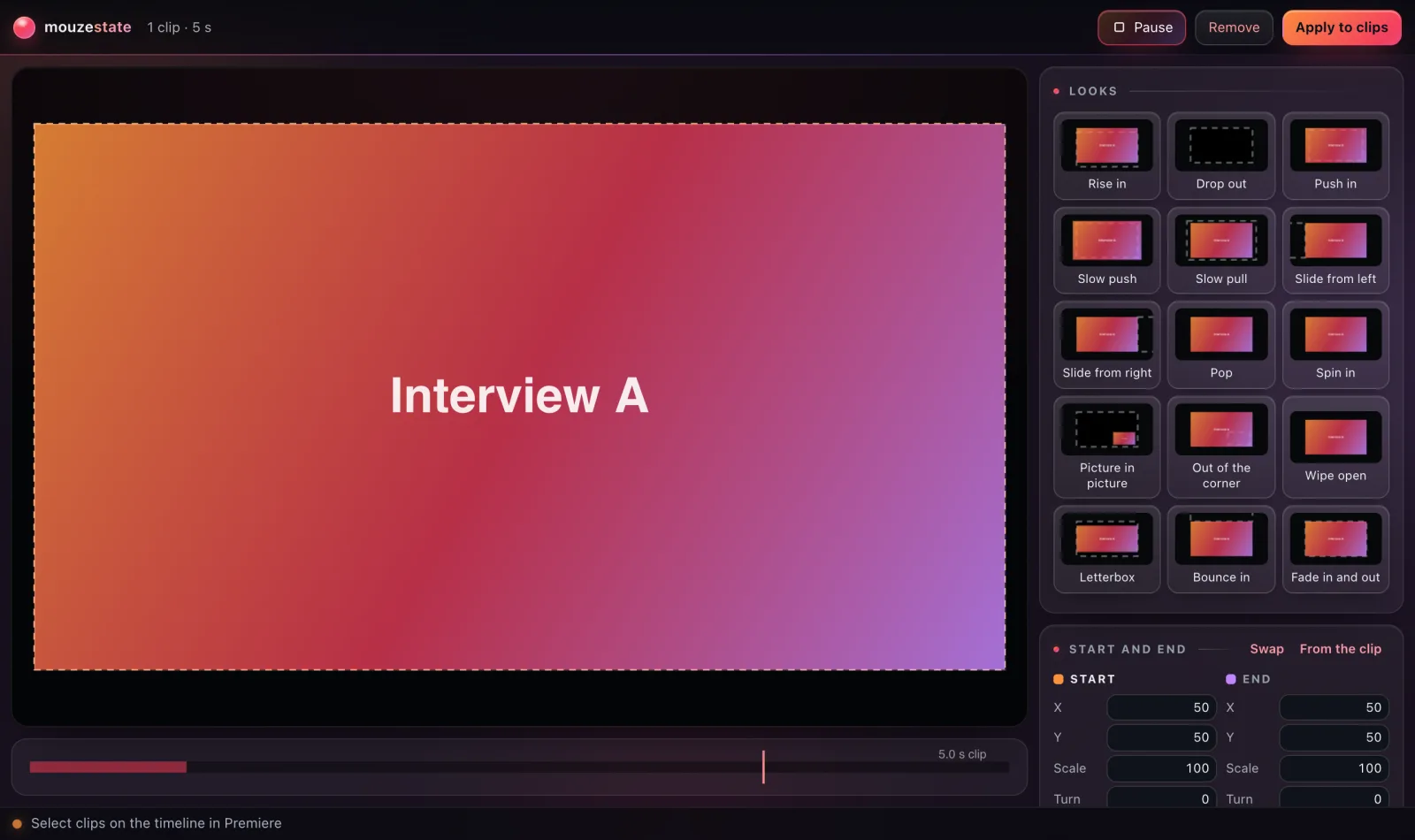
mouzestate · Premiere Pro

Two looks. One keyed move.

Set a clip’s start and end look: position, scale, rotation, opacity and crop. mouzestate keys the move with the ease, spring or bounce you pick.

Interview A
mouzestate1 clip · 2 s
  • 15 looks to start from. Rise in, Pop, Spin in, Picture in picture, Wipe open, Letterbox, Bounce in and more.
  • Start and end. X, Y, Scale, Turn, Opacity and Crop. Drag the clip in the preview, Swap, or take a look From the clip.
  • Four kinds of easing. Curve (9 shapes, eased In, Out or Both), Own curve with two handles, Spring or Bounce.
  • Timing. Start to end, End to start, There and back, Hold start or Hold end; at the start, at the end or the Whole clip.
  • Premiere’s own keyframes. Motion, Opacity and Crop, one key per frame while it moves, so the clips play anywhere. Up to 40 clips at once, each timed to its own length.
  • Clip to clip. Start as the clip before ends, End as the clip after starts, Bake again after a trim. Remove puts clips back.

Space plays the move · Enter applies it

Open itWindow › Extensions › mouzestate, in Premiere Pro

Back to the mouzestate card
mouzerun · After Effects

Your own buttons.
One click each.

Make a panel of buttons for After Effects. Each one runs a script, an expression, a preset, a menu command or an ease.

Aemouzerunin After Effects
Starters
Yours

Expression on 1 property

  • Script
  • Expression
  • Preset
  • Menu command
  • Ease

Ctrl + ZUndo mouzeclick: Wiggle

  • Five kinds of button. Script (code or a .jsx file), Expression, Preset, Menu command and Ease.
  • One undo step each. Menu commands keep After Effects’ own undo, and a script can opt out.
  • Alt-click: its other action. Loop’s is Ping-pong. Yours can run another button, or the same script with mouzerun.alt set. Right-click to change, duplicate, move or delete a button.
  • Presets can make their own layer. With nothing selected, choose a solid, a shape layer or a text layer.
  • Six starters, then yours. Wiggle, Loop, Smooth 60, Pre-compose, Centre layers, Nudge. Groups, 9 colours, 24 icons, search, Export and Import.

Open itWindow › Extensions › mouzerun, in After Effects

Back to the mouzerun card
mousecut · After Effects

An editor’s timeline,
inside After Effects.

Your active comp as an editing timeline: layers become clips on video tracks, sound sits on audio lanes.

Close gaps (with clips selected: only the gaps before them)

  • G closes the gaps and what follows moves with them. With clips selected, only the gaps before them.
  • Alt + ← / → nudges the selected clips a frame. Hold Shift for ten.
  • Ten tools: selection, track select forward, ripple, roll, rate stretch, razor, slip, slide, hand, zoom.
  • Cut, Lift, Extract, Insert, Overwrite, Unlink, with snapping to cuts, the playhead, In/Out and markers.
  • One undo step per edit. Ctrl + Z is After Effects’ own undo.

Open itWindow › Extensions › mousecut, in After Effects

Back to the mousecut card
mouzegrade · Premiere Pro · After Effects

Grade the shot by
clicking on it.

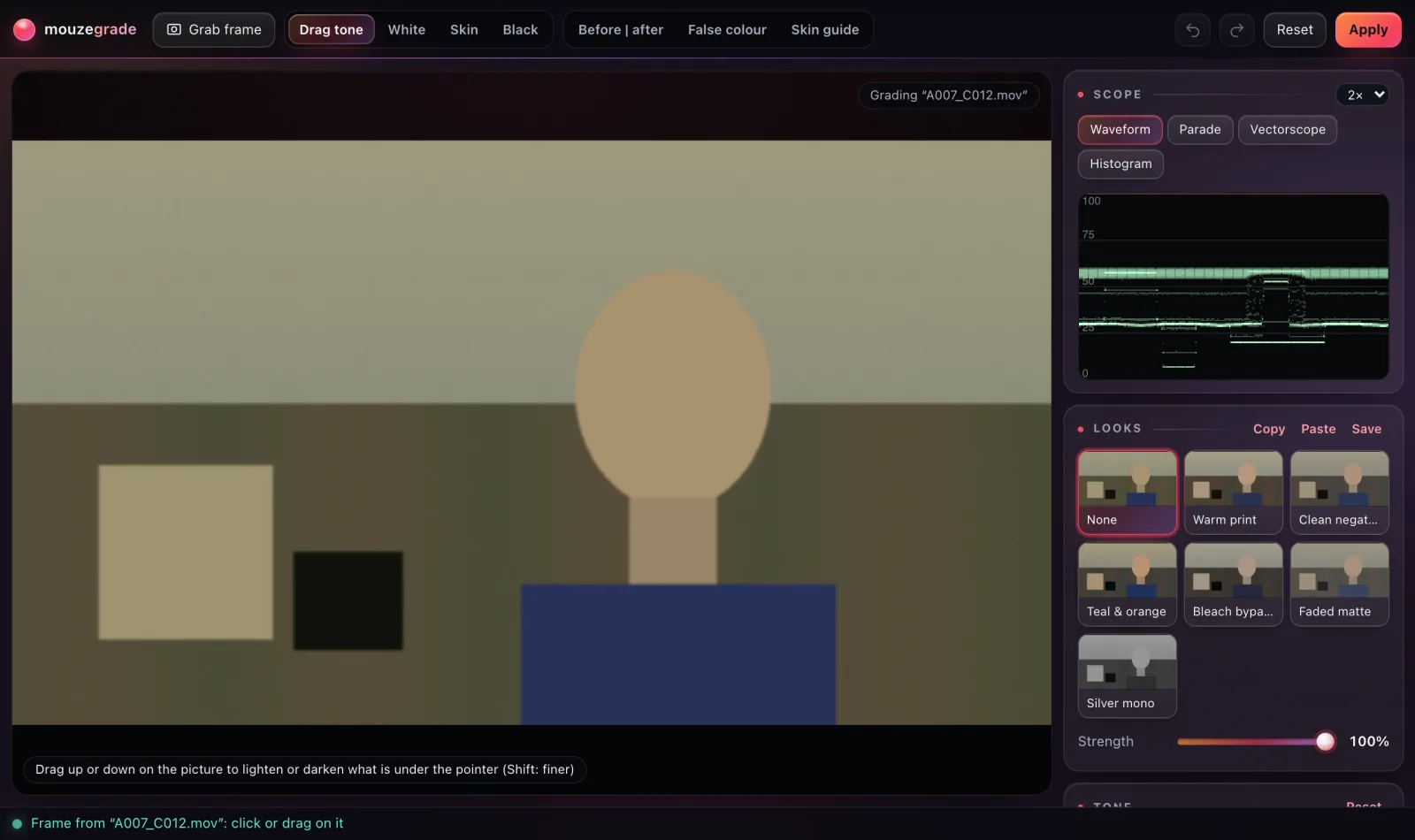
mouzegrade grabs the frame under the playhead. Click what should be white, black or skin, drag to lighten or darken, and Apply writes the grade into an effect on the clip, where you can open and change it. Grab that clip again later and its grade comes back.

mouzegradePrPremiere Pro
False colourSkin guide
Grading “A007_C012.mov”Drag up or down on the picture to lighten or darken what is under the pointer (Shift: finer)
Scope
Looks
NoneWarm printClean negativeTeal & orangeBleach bypassFaded matteSilver mono
Strength
100%
Tone
Highlights
-20
Shadows
32
Skin put on the skin line (it was 10° off)

White, black, skin.
Then drag for the rest.

  • Four click tools. Drag tone, White, Skin and Black, straight on the picture.
  • Four scopes. Waveform, Parade, Vectorscope with the skin line, and Histogram.
  • Six looks with a Strength slider: Warm print, Clean negative, Teal & orange, Bleach bypass, Faded matte, Silver mono. Save your own, copy and paste grades.
  • Nine tone sliders. Temperature, Tint, Exposure, Contrast, Highlights, Shadows, Whites, Blacks, Saturation.
  • LUTs and matching. Load a .cube and mix it in. Set a reference, then Match selected clips to its colour and contrast.
  • Three views. Before | after, False colour, Skin guide. Hold Q for the original.

Open itWindow › Extensions › mouzegrade

In Premiere Pro and After Effects, included in mouzeclick

Back to the mouzegrade card
mouzmic · After Effects

Cinematic colour on
live text and shapes.

mouzmic paints a colour gradient in the panel and puts it on the selected layers with After Effects’ own Calculations, Glow and Noise. The text stays live and editable, and a loop animates the gradient.

mouzmic
Gradient
Angle90°
  • 14 palettes, your own five colours and saved looks. Blend: Smooth, Oklab, Linear light or sRGB.
  • 5 gradient types: Linear, Radial, Conic, Diamond, Reflected. Fit to Content or Whole.
  • Depth and Turbulence: Dome, Sphere, Ridge, Wave or Bulge bend the bands; turbulence swirls them. Focus keeps a point sharp.
  • Glow, diffusion, grain are After Effects’ own Glow and Noise, ready to animate in Effect Controls.
  • Loops up to 20 s, 900 pictures at most: turn the angle, flow the colours.
  • Live sends each change when you let go. Apply and Remove are one undo step each.

Open itWindow › Extensions › mouzmic, in After Effects

Back to the mouzmic card
mouzsplit · Premiere Pro

Split screens and reframes,
built as a real sequence.

Choose what each pane shows and where it goes. Build sequence makes a new Premiere Pro sequence: the source nested once per pane, cropped with Crop and placed with Motion. The source stays untouched.

mouzsplitStream · 1920×1080

Layout · Gap 0 px

  • 7 layouts. Stacked halves, Face on top (1/3), Big with a corner, Side by side, Three rows, Grid of four, Reframe (one).
  • 4 new frames. 9:16, 1:1, 4:5 or 16:9, with a 0 to 80 px Gap between cells.
  • Drag to place. Windows on the source, cells on the new frame. Edges snap; an edge two cells share moves both (Alt moves one).
  • Per pane. Fill, Fit or Stretch, Zoom 25 to 400 %, Rotation, Horizontal and Vertical flip, exact Window % and Cell %.
  • Layout keys. Key here (K), step with [ and ], or Keys at cuts for one at every cut. They become hold keyframes.
  • Build sequence (Enter). Only the bottom copy keeps its sound, so the audio is not doubled.

Open itWindow › Extensions › mouzsplit, in Premiere Pro

Back to the mouzsplit card
mouzelayer · After Effects

Fly the globe.
Land in your comp.

A 3D globe with terrain, inside After Effects. Find a place, key the camera, send a plane or a ship between your pins, and Render to After Effects puts the frames in a new comp with the routes and the pins as layers.

  • Routes. A plane, a jet, a ship or a dot travelling between two of your pins, with a Follow or Chase camera. In After Effects the routes are their own picture layer, with a null following each plane for labels.
  • Clouds and lights. Planes and jets climb up through banks of cloud and come down through them, with contrails up high, wingtip vortices low down, landing lights, wingtip strobes, the plane’s red beacon and the jet’s afterburner.
  • Ships by sea. From the coast nearest the start, round the land and through canals and straits such as Suez, Panama and the Bosporus, with a wake, a bow wave and funnel smoke.
  • Camera moves. Keys arrive by Flight, Glide or Cut, eased Smooth, Linear, In or Out, plus a steady Orbit.
  • Find a place. A city, a country or coordinates such as 48.85, 2.35, found offline.
  • Six map styles. Night, Daylight, Relief, Ink, Neon and Blueprint, with terrain shaded by Relief, Height and Light from.
  • Pins as layers. A dot and a name for each pin, following the globe frame by frame.
  • Render to After Effects. Comp, 1080p, 4K, Vertical or Square, over Space, Clear or a Colour. The globe frames and the route pictures go in folders of their own and land in a new comp as one undo step.

K adds a camera key · Space plays the moves · N puts north up

Open itWindow › Extensions › mouzelayer, in After Effects

It needs mouzeclick running with an activated licence, and internet access for the map data.

Back to the mouzelayer card
Pricing

Every extension.
One plan.

All 22 extensions come with mouzeclick: eight for Premiere Pro and fifteen for After Effects, with mouzegrade in both. The app, its three wheels and the Studio are in the same plan. Each key is for one person on one computer.

mouzeclick

Everything included

was $40, now $25/ month

Everything was $40 a month. Now $25.

Per key, one computer. Pay once for 30 days, or monthly and it renews by itself: same price. A code takes 10% off the first 30-day or 1-year payment.

Or pay once for longer

Premiere Pro8 extensions

  • mouzestate Newstart and end looks with ease, spring or bounce
  • mouzsplitsplit screens in seven layouts
  • mouzegradeclick-to-grade colour in Premiere Pro
  • mouzebin Neworganise bins, find unused, duplicate and offline media, relink, rename
  • mouzemark NewYouTube chapters, marker import and export, markers into cuts
  • mouzezoom Newdrag a box to zoom into a screen recording
  • mouzetrans Newzoom, whip, spin, slide, blur, flash and glitch transitions
  • mouzebeat Newfinds the beat, adds markers, cuts to it and ducks music under voice

After Effects15 extensions

  • mouzekit New28 tools, one undo step each
  • mouzerun Newyour own buttons for scripts, expressions and presets
  • mousecutan editor’s timeline inside After Effects
  • mouzegradeclick-to-grade colour in After Effects
  • mouzmicgradients on text and shapes, 14 palettes
  • mouzelayer Newa 3D globe, planes and ships on routes, pins as layers
  • mouzevector Newpaste or open an SVG as shape layers that draw on
  • mouzeresize Newone comp into 9:16, 1:1, 4:5 and more
  • mouzeflow New15 transitions between layers
  • mouzeexpr New24 ready expressions with settings, Edit, Remove and Bake
  • mouzesaas Newapp screens, device frames, cursor, charts, loaders
  • mouzetype New17 kinetic type styles as real text animators
  • mouzecam Newcamera moves, handheld drift, parallax and rack focus
  • mouzeicons New90 original UI icons as shape layers that draw on
  • mouzeaccent Newbursts, sparkles, underlines, arrows, confetti, shine sweeps

One key, one computer. A 30-day pass, yearly or lifetime key is one key; need several? Choose Monthly and how many keys at checkout: 6 or more and every key is 10% off. Moving to a new one? Release it from your account

Priority support by email, for everyone: [email protected]

Billed in US dollars. To cancel a monthly subscription, email [email protected]

Setting up

Three steps,
then they are in your menus.

  1. Install mouzeclickInstall the app on your Windows PC or Mac and activate your licence.
  2. Install the extensionsOn the Tool wheel page, press Install Premiere bridge or Install After Effects bridge. Updates refresh the panels by themselves.
  3. Open themRestart Premiere Pro or After Effects, then open any panel from Window › Extensions. Keep mouzeclick running while you work.

Every panel, included.

Every Premiere Pro and After Effects panel is in mouzeclick, was $40, now $25 a month. Windows 10 and 11, and macOS 12 or newer.