
Your mouse, your rules.
How a 2 a.m. conversation with a tired video editor turned into mouzeclick, and why we built it for everyone who is fed up with reaching for the keyboard.
By Arvind Goswami, founder of mouzeclick · Mumbai, India
Chapter 01 Contents
It started with a tired editor at 2 a.m.
It was close to two in the morning. I was on a call with my editor, going through a project, and I asked him a simple question: what would make your work easier?
I expected him to ask for a faster computer, a new plugin or more storage. He didn't. He said he was tired. Not tired of editing, tired of reaching.
Every few seconds his right hand left the mouse to find a key on the keyboard: a cut, an undo, a ripple delete, a zoom, a switch to another window.
- Cut
- Undo
- Ripple delete
- Zoom
- Switch window
Then back to the mouse. Then back to the keyboard. Hundreds of times in a single session.
“I really need some shortcuts,” he said. “But I already know the shortcuts. The problem is that they're all over there.”
That line stayed with me.
The shortcuts were not the problem. Where they lived was the problem.
Chapter 02 Contents
The problem was never the editor, it was his tools
Once you see it, you can't stop seeing it. Most people who work on a computer all day sit with one hand on the mouse and the other hovering over a keyboard.
The mouse in their hand usually has extra buttons that do nothing useful. The keyboard was designed for typing letters, not for scrubbing a timeline or jumping between twelve open windows.
So the hand travels. Back and forth, all day. It is slow, it breaks your focus, and by the end of a long edit your wrist and shoulder know about it.
My editor was not doing anything wrong. He was doing exactly what his tools asked of him. The tools were asking for too much.
Chapter 03 Contents
Listening first: what the editor actually needed
We stayed on that call for a long time. I didn't pitch anything. I asked questions and wrote everything down.
The questions I asked
- Which actions do you repeat the most?
- Which ones do you forget?
- Which keyboard shortcut do you always have to look up?
- When do you switch apps, and how many times an hour?
- What does your mouse do that you never use?
By the end, the picture was clear.
He did not need more shortcuts. He needed the shortcuts he already had to be under his hand, in the app he was in, at the moment he needed them.
And he needed that without new hardware and without memorising another cheat sheet.
Chapter 04 Contents
A lot of ideas, most thrown away, and what survived
The next morning I started building. The first idea was simple: put the most common actions on the mouse's spare buttons. That helped, but a mouse only has so many buttons, and every app needs different ones.
So the ideas kept growing. What if one button opened a wheel of your favourite actions, and you just flicked towards the one you wanted? What if the same button did something different in Premiere Pro, in After Effects and in your browser, without you changing anything? What if a small movement while holding a button could do the job of a key combination?
I tried a lot of versions. Many looked clever and felt terrible to use, so they went in the bin. What survived is what you can use today:
What survivedThree wheels, one key each
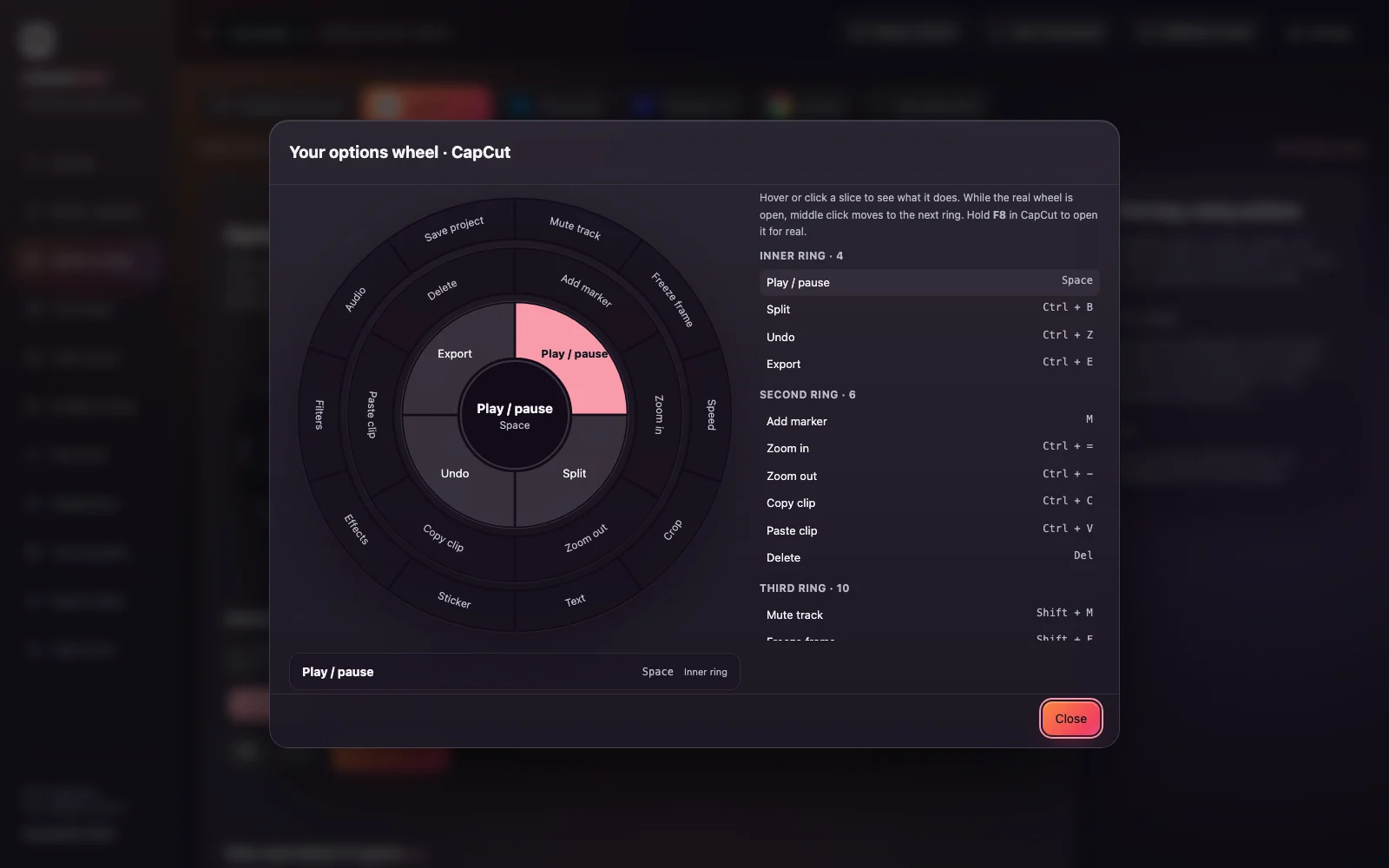
F8 The Options wheel
Up to 48 favourite actions on three rings, one press away.
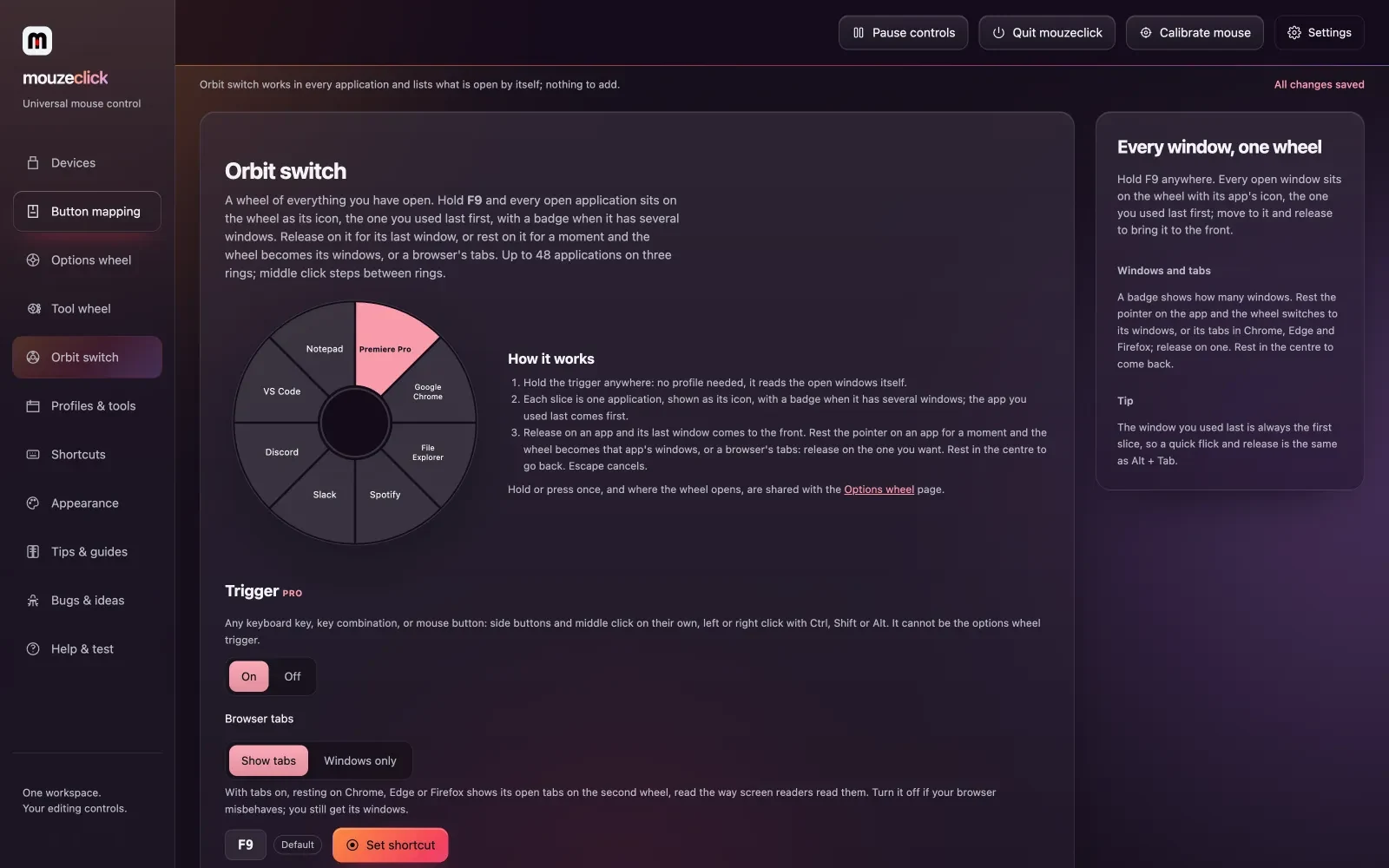
F9 The Orbit switch
Your open apps, their windows and even browser tabs, in a circle around your pointer.
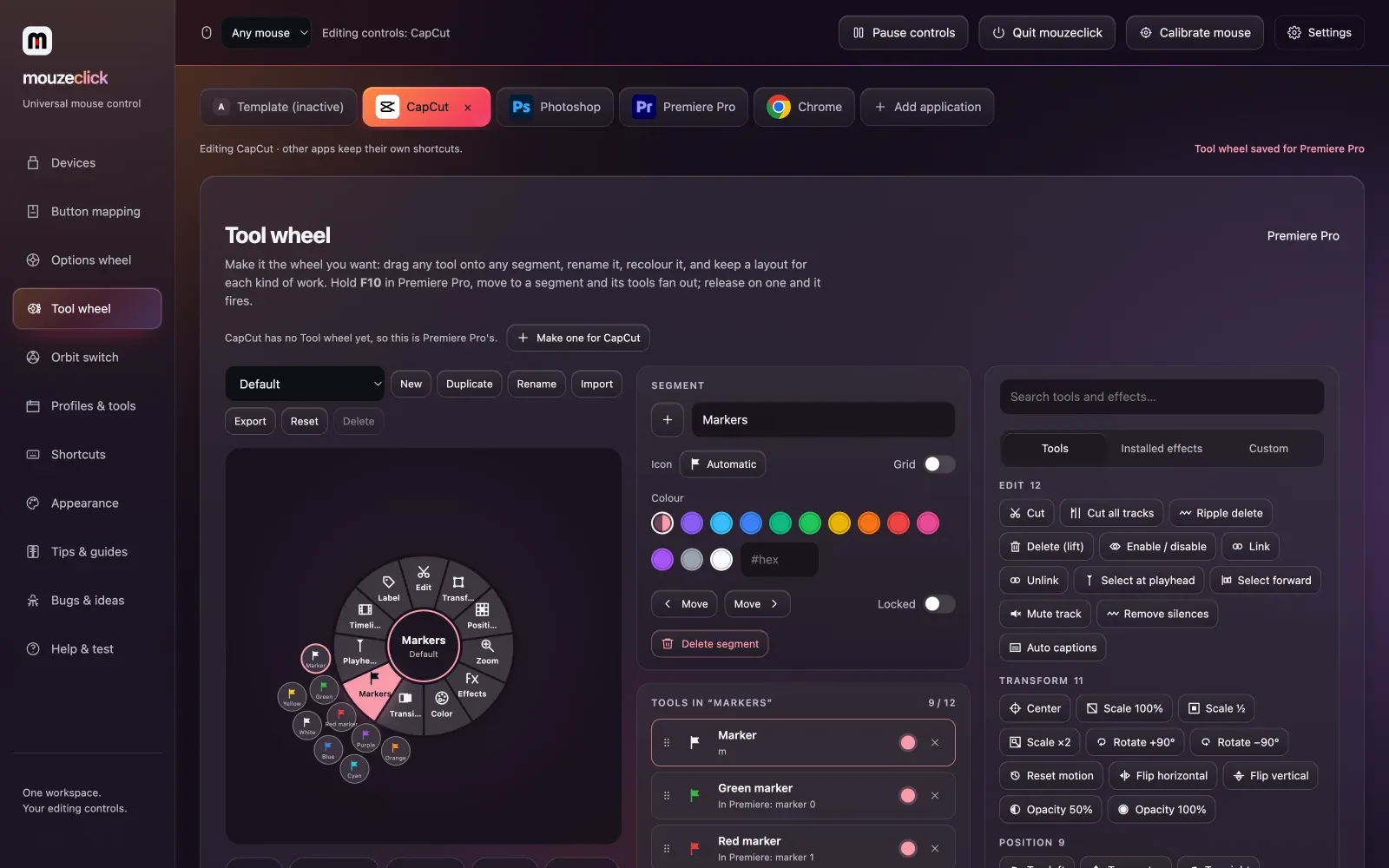
F10 The Tool wheel
Segments that fan out into tools for Premiere Pro and After Effects.
Per-app profiles
The same mouse button does the right thing in every app, automatically.
Buttons, gestures and macros
With a recorder, so anything you do with the keyboard can live on the mouse.
Chapter 05 Contents
Thirty days of late nights: the Studio and the extensions
What followed was about thirty days of continuous work. Long days, sleepless nights, and a lot of testing inside the real apps: Premiere Pro, After Effects, browsers and everyday Windows and Mac software. If something only worked in a demo, it didn't count.
The editing side grew fast. The mouzeclick Studio for Premiere Pro came out of the same conversations:
- Removing silences
- Captions with 289 styled looks
- Hinglish captions
- Retakes
- Timeline tools
- Safe frames and guides for 65 platform presets


Then came the extensions for Premiere Pro and After Effects, panels that do in one click what used to take a dozen.
From version 0.29 on, every release was written down and published, in order, on our What's new page. Scroll through What's new and you can watch the app grow release by release.
 Every change, written downRelease notes in the app, and every release since 0.29 on What's new
Chapter 06 Contents
Not just for editors: who mouzeclick is for
Video editors are the reason mouzeclick exists, and they are still the people we build for first. But somewhere in those thirty days it became obvious that the problem is much bigger than editing.
A designer jumping between Photoshop and a browser has the same problem. So does a developer switching between a code editor, a terminal and twenty tabs. So does anyone who spends the day in spreadsheets, email and video calls.
Everyone's hand travels. Everyone has a mouse with buttons that do nothing.
So mouzeclick works with any mouse, in any app. You don't need new hardware. You set it up once, and your setup follows you.
 Premiere Pro
 After Effects
 Photoshop
 Chrome
 VS Code
 Slack
Slack
- Mouse
- Any mouse. No new hardware.
- Runs on
- Windows 10 and 11, macOS 12 or newer
- Your setup
- Follows you to your other computer through your account (Windows only for now)
Chapter 07 Contents
Your mouse, your rules: what we promise
That is the whole idea, and it became our motto: your mouse, your rules. You decide what every button does, in every app. Here is what we promise in return:
Any mouse.
No special hardware and no lock-in. The mouse you already own is enough.
Honest pricing.
One plan with everything in it. The price you see is the price you pay. Pay for 30 days at a time, or monthly and cancel any time.
Every update in the open.
Each release is posted on What's new first, with its notes.
You shape what comes next.
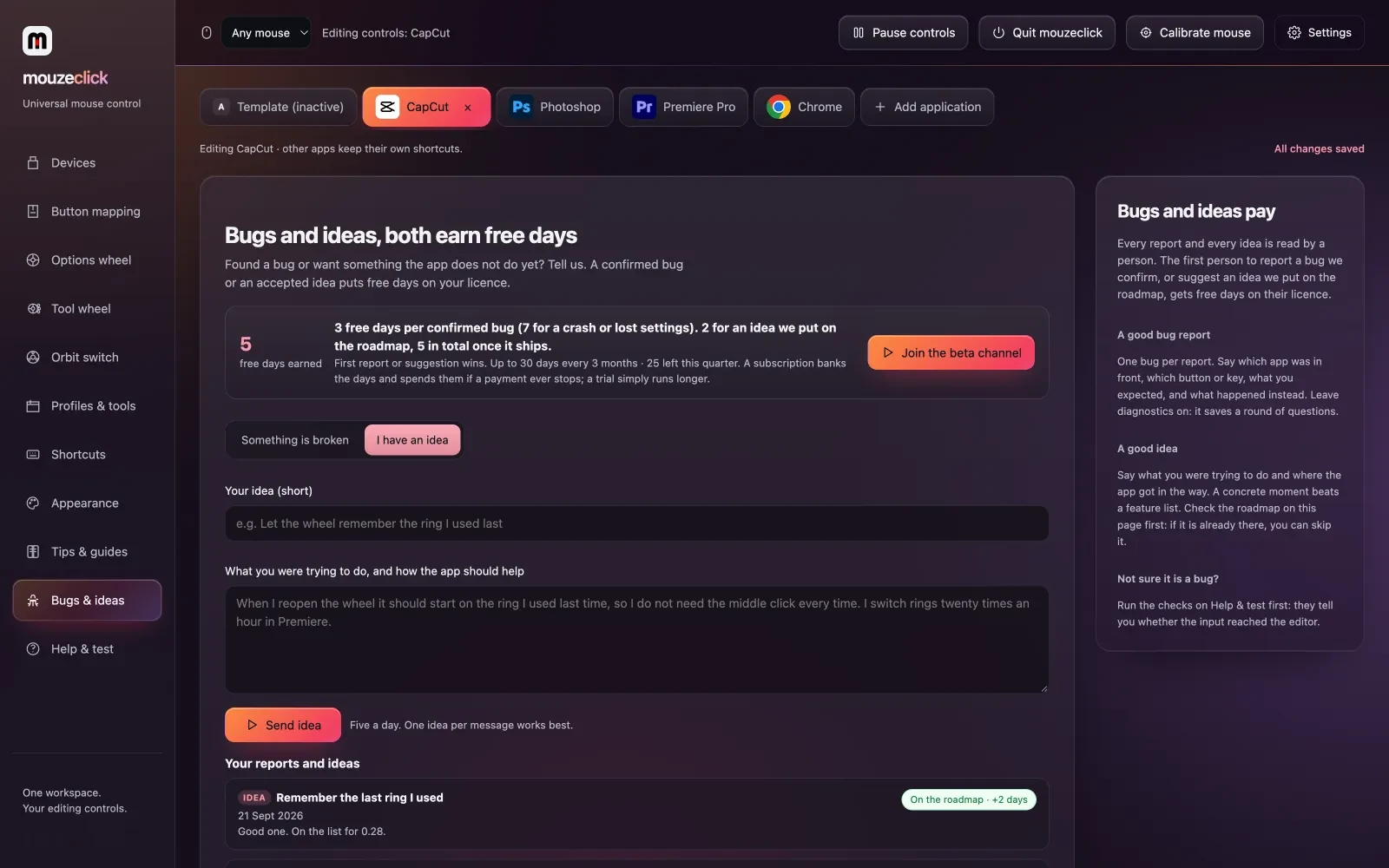
Send an idea from Bugs & ideas inside the app. If we put it on the roadmap, we add free days to your licence, and more when it ships. Confirmed bugs earn days too.
Chapter 08 Contents
Here we are: mouzeclick is open to everyone
- A month ago
- this was a tired editor on a late-night call.
- Today
- it is mouzeclick, and we are opening it to everyone.
If you have ever felt your hand leave the mouse one time too many, this was built for you.
Try it, tell us what's missing, and help us make the next version better. The next feature on the list might be yours.
Arvind Goswami
Founder of mouzeclick · Mumbai, India
Questions Contents
Questions about mouzeclick
Short answers on who makes it, why, and what it runs on.
Who makes mouzeclick?
mouzeclick was founded by Arvind Goswami in Mumbai, Maharashtra, India.
Why was mouzeclick created?
It started with a video editor who was tired of moving his hand between the mouse and the keyboard hundreds of times a session. mouzeclick puts those shortcuts on the mouse instead, per app.
Is mouzeclick only for video editors?
No. It started with editors and has tools made for Premiere Pro and After Effects, but it works in any app: browsers, design tools, office apps and code editors.
Do I need a special mouse?
No. mouzeclick works with any mouse. A mouse with extra side buttons gives you more to set up, but a basic mouse works too.
Which computers does it run on?
Windows 10 and 11, and macOS 12 or newer on Apple Silicon and Intel. The same licence key works on either.
How do I suggest a feature?
Open Bugs & ideas inside the app and choose I have an idea. Ideas we put on the roadmap add free days to your licence.
Make your mouse work for you.
was $40, now $25 a month, everything included. Windows 10 and 11, and macOS 12 or newer.